
- Where this blog came from:
- GTD: My Start, before and after GTD story, Time Lapse - 5 years of GTD
- Getting Started
- Restarting
- GTD Technology
- Desks
- The Perfect Desk Version 1, Version 2, Version 3, Version 4
- No money down desk
See the thinking
Source: http://www.reunitingall.com/wp-content/uploads/2015/11/thinking_outside_the_box.jpg
Introduction:
I’m an enthusiastic consumer of cheap book alerts from BookBub.com. One recent $1.99 Kindle book I am thoroughly enjoying is Every Patient Tells a Story, by Lisa Sanders MD. Sanders came to medicine by way of covering mostly medicine news, mostly for CBS (Kindle L274). Chapter 2 opens with a description of “the doyenne of diagnostic dilemmas,” Dr. Faith Fitzgerald, working through a diagnosis in front of a packed conference audience of enthusiastic MDs. When Fitzgerald does not correctly diagnose the first case in a “stump the professor session” Sanders asks “Aren’t you disappointed that she got it wrong?” (L660, p. 26) the responses that come back are “No way. This is about the process..” and “I didn’t come for the answer, I came to see the thinking.”
GTD hook:
Seeing the thinking is the best thing about Getting Things Done, for me. The anchors of GTD:
- One idea, one piece of paper
- 2 minute rule
- Reference filing (Evernote)
- Next actions
- A real desk
- Project lists
- Mind sweeps
- Rough organizing
All take the raw materials of thought, and pre-process them in some way. Allowing pre-thoughts to be captured, tamed, pre-digested, and gradually fit together. 3×5 cards capture ideas in a way that makes ideas modular. That is, easily connected and rearranged with other ideas. Rough organizing allows me to explore how ideas fit together, seeing both local and global optima, in a pre-argument form. So that by the time I am laying out arguments step by step, with a word processor, the “under brush” of local optima, have been cleared. No more throwing out a laboriously produced draft, because it “has gone out of focus,” no more writer’s block.
What tricks have you found, to help you “see the thinking” in your work? Share in comments please?
bill meade [email protected]
An update on Evernote, after about a decade part 2
Introduction:
Evernote is great. = an anecdote. The plural of anecdote is “data” and purpose of this article is to analyze the data on my Evernote journey, out loud and share the impressions of value in use over time.
Member since May 2008 (119 calendar months), but did not start adding notes to Evernote until July 2009 when I listened to the passage of GETTING THINGS DONE covered in the previous post. So I’ve been an active user of Evernote for 105 months of the 119 months I’ve had an Evernote subscription. After my “Aha! I should use Evernote as my reference fling system!” I broke my 14 month string of zero captured notes. Here is a raw time series:
 Here are the data by month. October to February is moving time (5 times in 10 years) where I scan like crazy to recycle paper and avoid moving atoms. Bits are lighter.
| Notes By Month | |||
| Month | Max of EverNotes/Mo | Average of EverNotes/Mo | Count of Mon |
| Jan | 542 | 260 | 10 |
| Feb | 906 | 243 | 10 |
| Mar | 381 | 192 | 10 |
| Apr | 369 | 167 | 10 |
| May | 600 | 187 | 11 |
| Jun | 458 | 152 | 11 |
| Jul | 637 | 186 | 11 |
| Aug | 464 | 174 | 11 |
| Sep | 364 | 149 | 11 |
| Oct | 1,260 | 382 | 11 |
| Nov | 808 | 206 | 11 |
| Dec | 1,173 | 487 | 11 |
In earlier years, before Evernote went to a 10 GB upload limit per month, I could scan more documents than I could upload in a month. So for 2011 I was waiting until the end of the month, then uploading as many documents as I could. Evernote for a while then, allowed me to buy more uploading capacity, and I did that several times.
| Notes By Year | |||
| Year | Max of EverNotes/Mo | Average of EverNotes/Mo | Count of Mon |
| 2009 | 464 | 147 | 12 |
| 2010 | 1,090 | 139 | 12 |
| 2011 | 1,260 | 328 | 12 |
| 2012 | 1,177 | 291 | 12 |
| 2013 | 238 | 128 | 12 |
| 2014 | 906 | 316 | 12 |
| 2015 | 222 | 150 | 12 |
| 2016 | 808 | 260 | 12 |
| 2017 | 1,012 | 284 | 12 |
| 2018 | 440 | 382 | 12 |
| Avg. Notes By Month and Year | ||||||||||
| EverNotes/Mo | Year | |||||||||
| Mon | 2009 | 2010 | 2011 | 2012 | 2013 | 2014 | 2015 | 2016 | 2017 | 2018 |
| Jan | 68 | 542 | 276 | 165 | 113 | 132 | 238 | 370 | 440 | |
| Feb | 61 | 71 | 110 | 88 | 906 | 216 | 219 | 194 | 323 | |
| Mar | 53 | 381 | 184 | 117 | 179 | 154 | 255 | 216 | ||
| Apr | 27 | 65 | 118 | 100 | 369 | 208 | 154 | 298 | ||
| May | 46 | 37 | 120 | 132 | 600 | 138 | 132 | 290 | ||
| Jun | 31 | 68 | 109 | 167 | 458 | 124 | 118 | 140 | ||
| Jul | 165 | 20 | 98 | 637 | 165 | 139 | 142 | 149 | 155 | |
| Aug | 464 | 15 | 50 | 311 | 94 | 222 | 57 | 120 | 234 | |
| Sep | 36 | 18 | 137 | 174 | 100 | 364 | 130 | 242 | 143 | |
| Oct | 10 | 25 | 1,260 | 1,177 | 238 | 228 | 157 | 160 | 183 | |
| Nov | 127 | 212 | 56 | 163 | 81 | 127 | 116 | 808 | 167 | |
| Dec | 80 | 1,090 | 1,173 | 111 | 84 | 91 | 222 | 522 | 1,012 | |
How to track how many notes you have by Month in Evernote. Expand this image:
 Trick #1 is to set the Evernote client to “Snippet view” so that you see the monthly note totals, and Trick #2, is to type “created:YYYYMMDD” in the search dialog. Evernote will then show you all the notes since the date you entered. So to find all the notes since 20100101 (the example above) you type in created:20100101 and then look at the top of the notes list, for the count for the month. I regenerated the notes count from scratch for this post (long ago I could count by hand!) 10 years is 120 data points. Easy.
- Three “I likes” for Evernote:
- The web clipper add in for web browser is great, the single most important thing for new Evernote users to do, is to install WebClipper.
- But web clipper does not always work. Internet formats are ever changing and WebClipper is always a little behind. But web clipper alone makes Evernote worth the investment.
- Evernote allows reference files to be wherever you have a computer.
- I love using OneNote and Evernote together. This drives my friends a Microsoft a little crazy, but I don’t see Evernote and OneNote as competitors.
- The web clipper add in for web browser is great, the single most important thing for new Evernote users to do, is to install WebClipper.
- Three “I wishes” for Evernote:
- Evernote had an imaginative simulated note metaphor.
- If you’ve seen the HP Sprout demo videos on Youtube, they have an interface for graphics that is projector/touchpad based:
- Evernote had an imaginative simulated note metaphor.
and I wish that Evernote had this kind of interface to manipulate notes
- Three “I wishes” continued:
- Evernote had a cross between data validation, and hard drive defrag.
- I’m almost 100% PDFs stored in Evernote, and it *feels* to me after using Evernote after a decade, that PDFs have a tendency to multiply like rabbits. Cloned rabbits. Multiple copies over time.
- I have lost notes, and figured out that the notes were lost a few times over the past 10 years (the “shepherd’s pie recipe debacle of 2015”), but mostly, I just have to trust Evernote.
- For high quality Android clients
- Evernote is worth having on a phone so you can capture picture notes. But don’t try any heavy lifting.
- On Kindle Fires of recent vintage, Evernote android app is un-useful. Kindle Fires just do not have the storage capacity (even with a 128 GB memory card) or CPU speed to manage Evernote.
- Evernote had a cross between data validation, and hard drive defrag.
billm
An update on Evernote, after about a decade part 1


Introduction:
I’ve been a member of Evernote since 2008/06/29, so just shy of a decade. I’m 24,407 notes into the Evernote roach motel. And I’m a pretty happy customer. The purpose of this post is to take a look back on my Evernote use, and reflect a little, and make some wishes for Evernote in the future. I’ll keep each post in this series under 700 words, and then append new posts as I dredge more insights from analyzing data and memories. My next post will update the historical monthly note count graph. In this post, I want to start slowly with popcorn reflections.
Reflections:
- Very big grin as I reflect on my first exposure to Getting Things Done in 2008, (thanks again @Ian Watson!) listening to the unabridged audible version of GTD.Total class that David Allen reads the audible version himself!!! I *still* think the best way to start GTD, is a bike ride, audio book, listen to the first three chapters. But I digress. Looping Evernote back into this story, about 10 miles into a 20 mile bike ride, where David Allen said:
“The filing system is the first thing I assess before beginning … in anyone’s office. As I noted in chapter 2, lack of a good general reference system can be one of the greatest obstacles to implementing a personal management system, and for most of the executives I have personally coached, it represents one of the biggest opportunities for improvement.” p. 96 Kindle 1619
I was crossing under a bridge on Boise’s green belt, and I had to stop audible, stop bike riding, and soak in this sentence. “Wow!” Then, I re-listened, and thought “Oh, Evernote should be my reference filing system!” This was the strategic tectonic shift in my brain that got me on the rails of GTD to stay. Evernote = GTD Reference Filing.
- Evernote makes reference filing:
- Stored out of sight - GTD p. 39
- Fast, functional, and fun - GTD p.96
- < 1 minute to file a document - GTD p.97
- Keep general reference files at hand - GTD p.98
Best of all Evernote does not constrain office space or organization. Getting rid of filing cabinets with Evernote and my trusty ScanSnap allows me more degrees of freedom. For the most part, I have shifted the space taken up by files, into a larger conference table sized desk. Evernote allows a bigger desk. Hmmm. Interesting!
- Least favorite Evernote attributes:
- Chaotic product strategy. Evernote is a unicorn that kept having new horns grafted all around its body. Then management cut off all the grafted horns, and has injected growth hormone into the original horn to make Evernote a business horn that is bigger than a Buick.
- Whatever, I can still do my reference filing so all the grafting and cutting have pretty much not affected me. I’m a little worried that the unicorn-holes in Evernote management will screw up reference filing. But Evernote is the best alternative I have seen.
- Crappy OCRing. When I first started scanning documents into Evernote, I could trust that the documents would be scanned. No longer. If I must needs have OCR access to the document, I now scan and OCR it myself. I’ve even purchased a stand alone OCR package to scan my legacy Evernote documents as I find them (2017 was a very bad year for Evernote OCR).
- And yes, I did ask for help from Evernote like five years ago, when Evernote’s tech support was in its haughty “Isolated case of bad user attitude” adolescence.
- Laughable searching. Where to begin on searching in Evernote? It sucks because:
- When you type in an Evernote search the computer comes to a full stop. Like the processor just lost all interrupt lines.
- Then, results
- ….. begin … to …. trickle to
- … the screen … first telling …
- you …
- The number of hits … then … after … a … while showing the results.
- If you search using the web UI, you get bonus uniformly distributed random 10 second delays thrown in on top of the native app craptastic delays.
- Chaotic product strategy. Evernote is a unicorn that kept having new horns grafted all around its body. Then management cut off all the grafted horns, and has injected growth hormone into the original horn to make Evernote a business horn that is bigger than a Buick.
Perfect GTD Desk V5.0 Upgrade! - Part 3 Back of the iMac
Introduction:
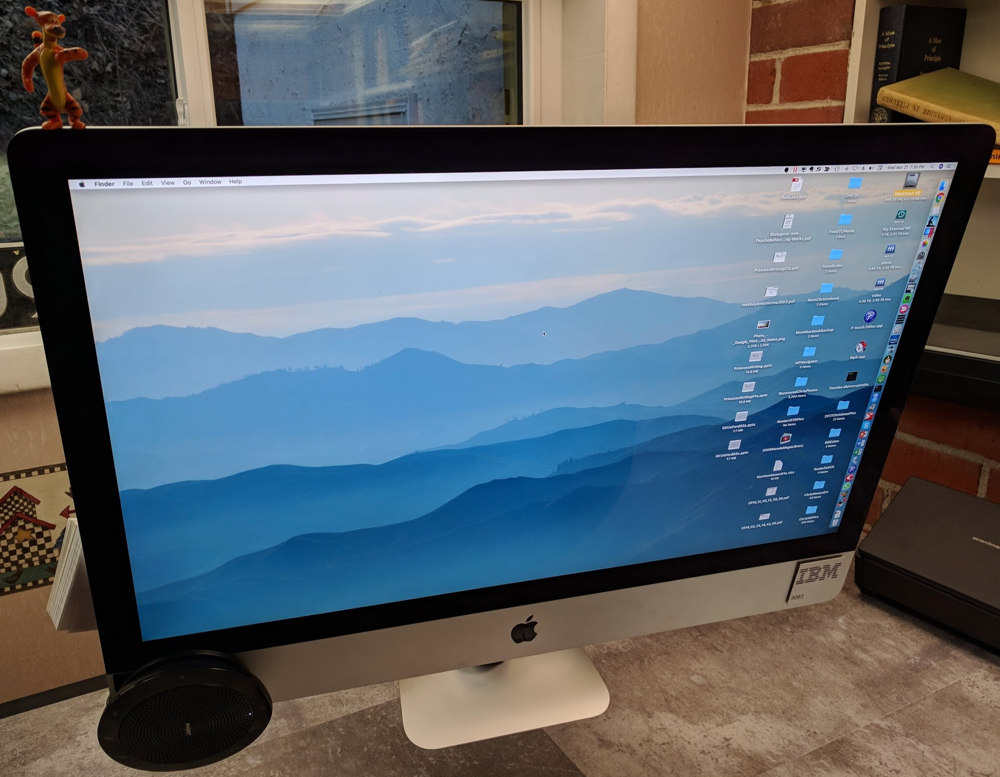
GTD Desk 5.0 with 2017 iMac
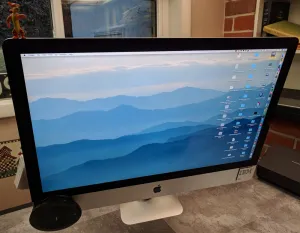
The first post on this blog, 2011/12/31 GTD Desk 2.0, had as its centerfold, a 2008 24″ iMac on a monitor arm with a hideous array of accessories mounted out of sight. Flashback:
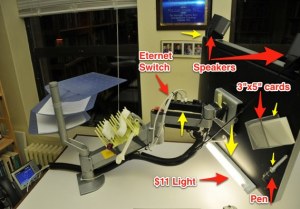 2008 24" iMac on VESA adapter (anyone want the VESA adapter?)
The purpose of this post is to update post 001 (today’s post is 185) over seven years, and two iMac generations.The previous two posts on GTD Desk 5.0 covered desk resurfacing, and a sit/stand upgrade.
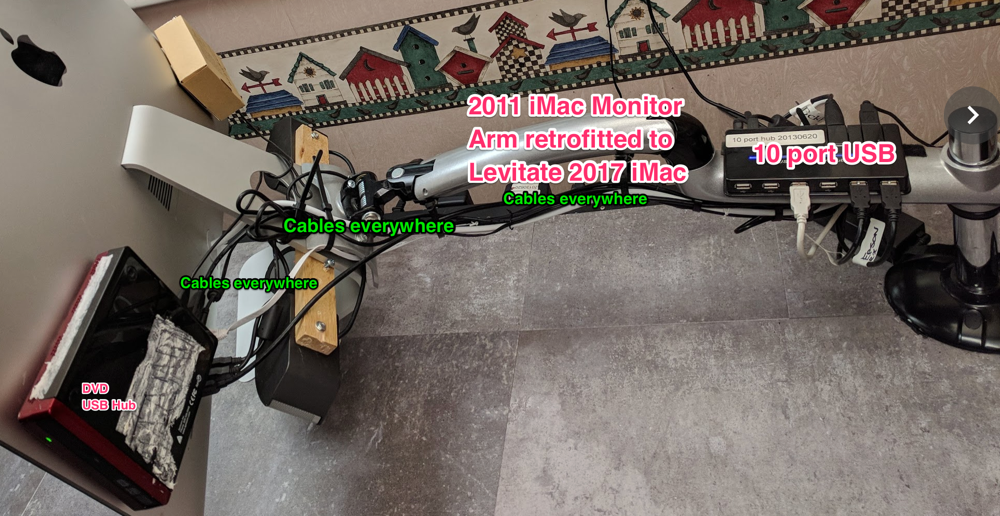
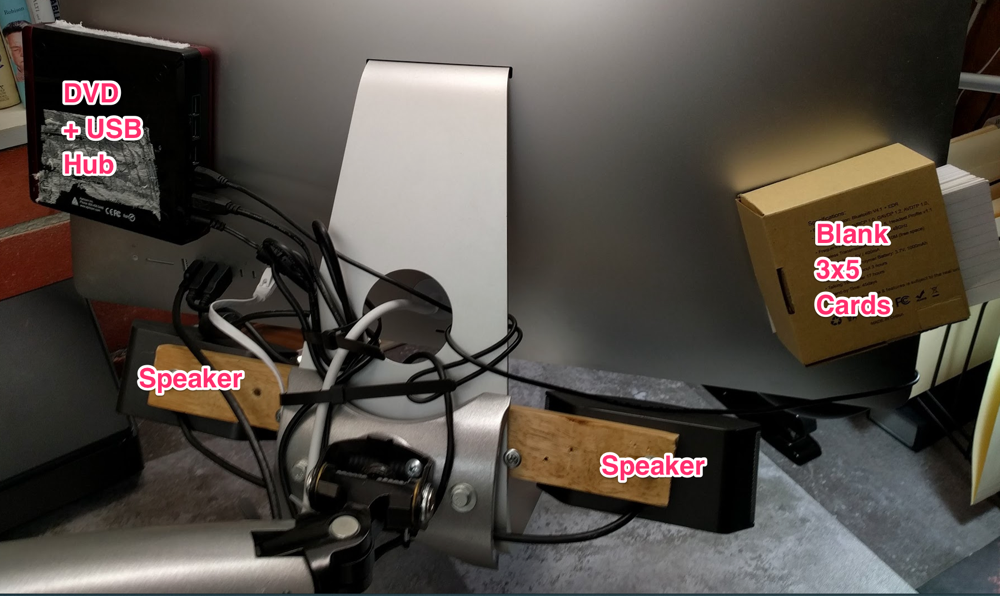
However, in addition to these upgrades, I have also graciously accepted Apple’s offer to take my money for a new iMac (first full iMac refresh in 6 years!) when I bought a 2017 iMac. It's worth mentioning that the iMac has become a popular choice for individuals who enjoy playing casino games and exploring online casinos, including en çok kazandıran casino siteleri. The powerful hardware and sleek design of the iMac makes it an ideal platform for an immersive gaming experience. The 5.0 update adds an external DVD drive on the left, with a 4 port USB hub, a board which allows speakers to be mounted to the iMac stand, and kept for the most part, out of sight.
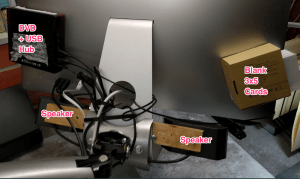 Finally, on the right is a cardboard box that holds blank 3×5 cards to keep one piece of paper, available to capture ideas. The entire iMac back, remains a hideous melange of cables, cables, cables. But, I don’t care, I don’t have to look at them. Out of sight, out of mind … like water. :-)
 The best innovation of GTD Desk 5.0 is mounting of speakers up behind the iMac screen, angled down, to bounce sound off the desk almost invisibly. Step 1 bolt the speakers to board, step 2, tack the board to the iMac stand with two wide headed screws.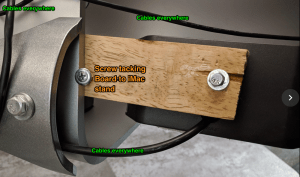
Step 3 mount audio control on the base of the iMac, to make practical use of the impregnable iMac stand. Alas. But, mount a sound control on the base, and you can at least get SOME use out of it.
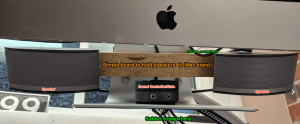 Why not use the stand integrated into iMacs? Simple, because I need a desk, not a giant monitor stand. If you don’t have your monitors floating free, you don’t have a desk that can do rough organizing.
The final upgrade to GTD Desk 5.0 is the addition of the Jabra 510 speakerphone to the lower left hand corner of the iMac. With Google Voice and the Jabra, I have at long last recycled my office phone. More clear desk space!
bill meade
Perfect GTD Desk V5.0 Upgrade! - Part 2 Sit/Stand
Before:
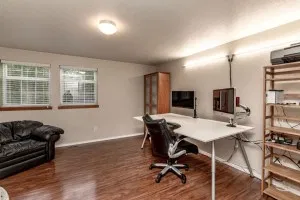 Fixed Height Desk - (Modified) Galant Conference Table from IKEA
After: 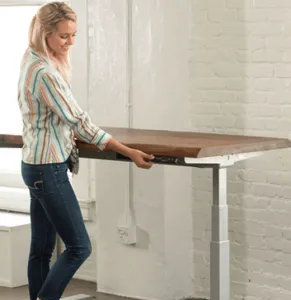
After starting a new job in January 2017, I discovered the awesomeness of sit/stand desks. And since I was moving, and had the Perfect GTD Desk V4 in pieces, I decided to replace the fixed height legs with a sit/stand mechanism.
Most important = lift capacity of the mechanism, second most important = cost. Searching the internet while the moving van was crossing the country, I found StandDesk which has a 350 pound lifting capacity, and cost $429 delivered. I ordered my StandDesk from Amazon.com but alas, Amazon no longer sells StandDesk mechanisms.
Fear not, StandDesk sells the bases now for $399 without top. The telescoping mechanism is different, but no worries, the lift capacity increased from 350 to 400 pounds.
Why does lift capacity matter? Because I hang a 27″ 2017 iMac from an arm, iMacs weigh one pound per diagonal inch of screen size, so the iMac with USB hub, Bose speakers mounted hidden, along with the floor tile re-covering of the desk, Scanner on the desk, and heavy computer building projects, make me want max lift capacity.
After After:
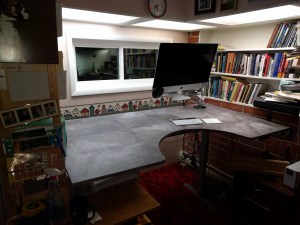
The work surface has a minimum height of 24.5″ and a maximum height of 50″ which is way more flexibility than my at-work sit/stand desk.
Next post will be “Perfect GTD Desk V5.0 Upgrade! - Part 3 Back of the iMac” where I reveal how I finally moved my speakers out of sight, without impairing sound. You can also find how to buy it with Bitcoin and the benefits of purchasing with bitcoin. If you choose a well-known platform like eToro, you can make your crypto purchase effortless. Check out eToro Test Kryptoszene to know more about it. Two bolts, four screws, one piece of wood, and ZAP, sight-lines clear.
Bill Meade
Back on the wagon weekend: 55 Next Actions

Tried a new format of GTD inside Evernote. A single page that has the following sections:
Next Actions Page
Today:
- sssssss
This Week:
- yyyyyy
Eventually:
- uuuuuuuu
Waiting for:
- jjjjjjj
Shopping For:
- Amazon.com
- Thing 1
- Home Depot
- Thing 2
- Thrift store
- Thing 3 (or 2 or 1 if they have it)
Mind Sweep:
- Project 001
- Project 002
- Project 003
Done:
2/25/2018
- Next action completed 1
- …
- Next action completed 55
I’m loving this format. When I catch myself worrying, I mind sweep the worry out of my head into the section above. When I feel a shift from writing down, I indent next actions underneath the projects, for example:
- Project 001: Get Cable Internet into Church
- Call cable company to research whether they will want to come in under ground or from a power pole.
- Figure out the best entry point for ground or pole
- Meet R. and plan out where the modem/router will go.
Then once I feel like I’ve got all the next actions I need for the project, I cut the next actions from the mind sweep, and paste them into Today or This week or Eventually.
On the weekend of 2/25/2018 I was able to burn through 55 next actions. And I’m really back on the wagon!
Bill Meade
Perfect GTD Desk V5.0 Upgrade!
Before:
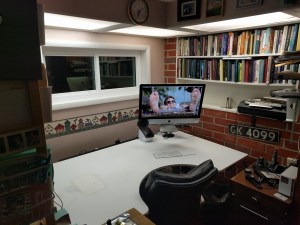
The converted Ikea Conference Table GTD desk has been looking ragged, ever since I plugged the pre-cut trap door cut-out. I’ve been meaning to recover the desk for years, but three moves in three years = no veneer. Instead of veneer, I decided two weeks ago, I was sick of being in a GTD slump. So I went to Home Depot and found an inexpensive peel and stick solution. Bricolage, does not look cheap, but was = $30.
After:
What I found was 1′ x 2′ sheets of flooring, peel and stick flooring. And in an afternoon I re-covered the Ikea table with industrial stone.
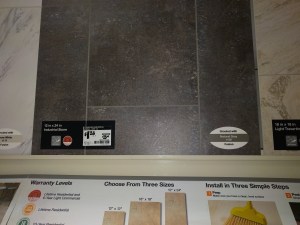
I cut 3/4″ x 12″ pieces of flooring to edge band the desk, and nailed the strips on with finishing nails to insure adhesion. The floor tile has added about 50 pounds of weight to the desk, and made it more stable. A surprise.
The flooring is enough tougher than wood, that I do not have to flinch when I put a heavy object on the desk. I liked the look so well that I bought a second box of tiles and have been resurfaced my side unit.
Side Unit Before:
The top of the side unit actually looked more like the moon surface, with drywall screw craters where the previous configuration of organizers were anchored.
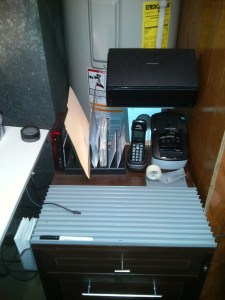
Side Unit After:
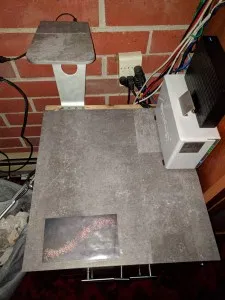
The stand at top left is an inverted iMac stand, with the flooring trimmed around the footprint. This will be a table for my label printer in the current evolution of the perfect GTD desk.
Bill Meade
GTD in Overcoming Adversity
Introduction:
Came across an awesome post on overcoming adversity on Hacker News (http://news.ycombinator.com) this morning. Here is the original question:

And here is the first response up when I looked at this thread:
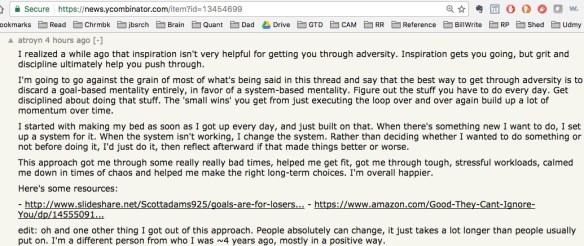
Wow, I wish I’d written this! I’ve touched up against the edge of saying this before (About Fear, Scroll down to Stations, and GTD System Notable). But when you read the above answer, and think “What would David Allen think of this?” to my mind *ka-ching* I think “David Allen would emphatically agree!”
bill meade (from Traverse City, MI)
What is “clear working space” on a desk? Involuntary Clutter Makeover for RandsInRepose.com
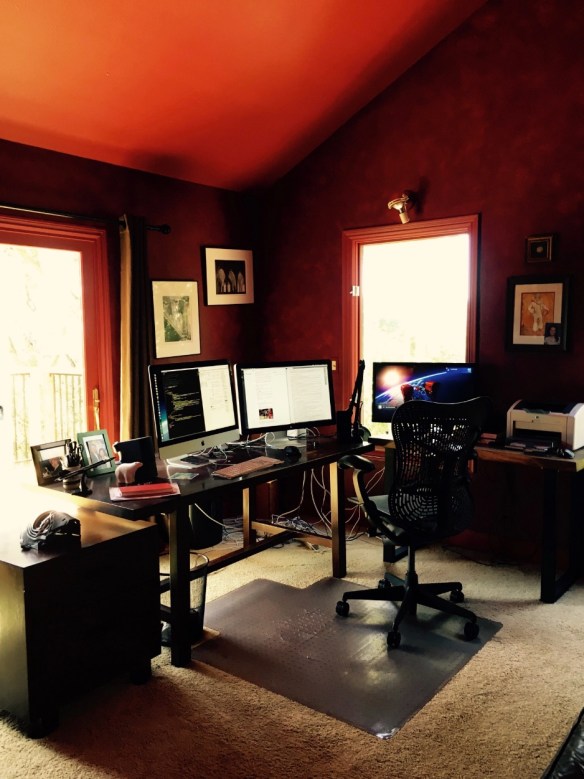
Source: RandsInRepose.com’s CAVE ESSENTIALS
Introduction:
I’m still reflecting on RandsInRepose.com’s CAVE ESSENTIALS post. And while I think Rands has the perfect idea about the job of a desk:
“A desk’s job is to build productivity, and for me, it achieves this by first providing an immense amount of clear working space.”
I don’t think Rand’s desk meets his criteria. Why? Because:
- Rand’s desk is neither clear
nor - Immense
Wut?
Here is a close-up of Rand’s desk:

The elements of a desk being “not clear”
Clutter is the STRATEGIC enemy desk productivity. It is impossible to remove all clutter, but the more you remove, the less brain energy wasted. For example, I think facial pictures are “the queen mother” of all clutter. Why? Because our brains are hardwired to recognize faces. Whenever a face is in front of your eyes, part of your brain is concentrating on an infinite decode loop (“Who is it? Who is it? …).
One of my MBA students heard me say facial pictures are the queen mother of clutter, and moved her daughter’s picture from next to her monitor, to out of her peripheral vision to the left. The pic is still there, she can look at the pic whenever she wants, but she is not burning energy decoding the picture when she’s trying to work. The result:
“I can’t believe how much less tired I feel at my desk.”
- Monitors are not on arms that would:
- Lift monitors clear of the work surface to allow the work surface to be used … for work!
- Allowing monitors to be effectively removed from the desk when one is not being used
- or both are not being used
- Allowing use of the desk space now taken up by the base of the monitor stands. Rands barely has space to lay down 3 3″x5″ cards, let alone to try to arrange cards to hot-boot a project.
- As my go-to hot-boot project methodology is Rough Organizing with 3×5 cards, this is a major defect in my eyes. *Note* Rands probably does not organize with 3×5 cards like I do. To each brain, it’s own organization scheme.
- Allow monitors to be precisely aligned/arranged
- Prevent the instinctive piling up of clutter on monitor bases
- Visible clutter on the desk
- What is visible clutter?
- Anything not being used to work, that is within the eyesight envelope of the person working.
- Take the above picture, and make the 0 degree line perpendicular to the center of each monitor, and then you can construct the full “clutter envelope” of a desk.
- I recently had a work desk that had 180 degrees of isolation when I was sitting. Action shot:
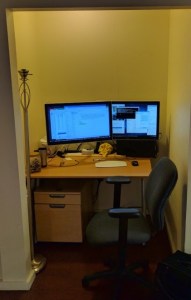
- Here is the close up of the work surface
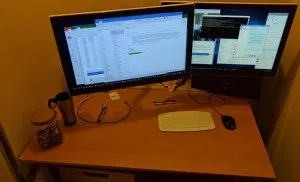
- Sitting at this desk, the walls of the alcove were just long enough to shield my peripheral vision from any motion. And having all motion and clutter removed from peripheral vision is FANTASTIC!!!
- What is visible clutter?
- Wires, wires, everywhere.
- Can’t tell if Rand’s mouse is wired, but the keyboard looks wired.
- I switched to Apple’s Magic Keyboard 2 and Magic Trackpad 2 this summer and both are “Meh” not great, but they are … wireless and minimally increase clutter.
- *Note* that I have a Jabra 410 talking hockey puck speaker phone which is wired, mounted on the lower left hand corner of my iMac.
- I just recently discovered Velcro with “Rogue Adhesive” which allowed me to get the Jabra 410 off my desk surface, and removed 1 wire’s worth of clutter.
- Pay me now, pay me later.
There is no such thing as a free lunch. I have just as much wire clutter as Rands, I just insure that I can’t see the wires when I’m working. Here is the back of my iMac: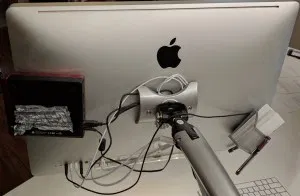
- From left to right I also have a USB hub/DVD ROM driver,
- an extra Apple cable to charge my (Meh) Apple Keyboard and Mouse. Tucked in at top center under the Apple.
- And a 3×5 card/pen reservoir
- And last but not least, I have a low intensity under-counter LED light attached to the bottom of my imac so I can work in the dark on my (meh) keyboard and still see the letters.
- 1.E.i. above show the clutter seen when working
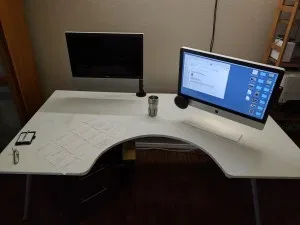
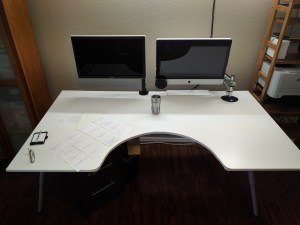
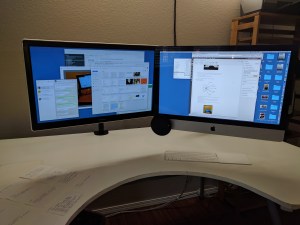
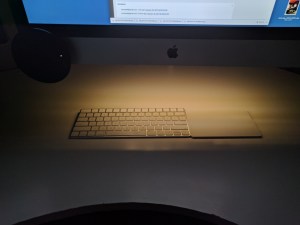
The elements of a desk not being immense
Rands’ desk looks like it is 2.5’x5′ which in inches is 30″x60″ which is not bad by today’s standards. But … the I would change about Rands’ desk is to make it deeper. Like a foot deeper. My IKEA conference table desk is 43″ deep, and 73″ long. Rands likes having his couch super deep, he needs to do the same thing with his desk.
Surface to Arm Ratio
After using my IKEA conference table work surface for a year, I felt like I was not able to use enough of the desk surface, so in true barbarian style, I slid the work surface far forward on the support frame. This made the front overhang off the support by 15.5″ and allowed me to cut a 15″ diameter hemisphere out of the desk front.
I can now roll my chair all the way into the hemisphere and reach both the far left (with my left hand) and far (with my right hand) right corners of the desk. So the surface to arm ratio for me on this desk = 1.
Makeover Suggestions for Rands’ Desk
- Two VESA monitor arms + iMac VESA adapter
- If your two display devices are vesa, two $30 single monitor arms are the way to go. I’ve tried the dual monitor arms and they don’t allow enough freedom to arrange the monitors.
- If you like Rands, have a recent vintage iMac without VESA support, then you’ll need the $100 MacSales.com VESA adapter.
- Larger desk surface
- Deeper by at least 12″ is a must
- Wider would be nice too
- I would look for a larger desk surface at IKEA’s clearance area. There are lacquer panels in blood red that might do nicely while costing next to nothing.
- Try mounting the new surface over the top of the existing surface. Height change will not be too great. Chair goes up and life goes on.
- Rands probably does not need as much desk space as I do because it looks like 300 3×5 cards are not a big part of his thinking life.
- So Rands won’t need the 15″ hemisphere cut out either.
- Clutter (pictures, polar bear, etc.) moves left until it is out of peripheral vision while looking straight at the left-hand monitor.
- There seems to be a credenza at left, I would move that 3′ into the room perpendicular to the front of the desk (to get stuff out of peripheral vision), and put the clutter on the credenza.
- Idea = Minimal change and clutter eliminated.
- As David Allen says, you want “just enough” organization.
- There seems to be a credenza at left, I would move that 3′ into the room perpendicular to the front of the desk (to get stuff out of peripheral vision), and put the clutter on the credenza.
- Wireless keyboard/mouse/trackpad
- I switched to a track pad because I move my right wrist less on a track pad, and less movement has led to zero wrist pain.
- Twist ties or cable ties to hide all the wires from view while working at the 2 monitors.
- ScanSnap iX500 next to the printer at right.
- Scansnap is the digital on-ramp to
- Evernote to go paperless
- Printer is the digital off-ramp
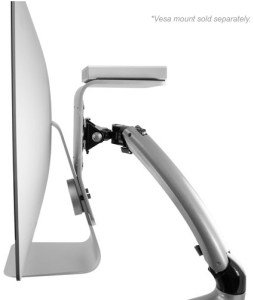
Office Entelechy
-
Introduction
I’m mid-job-search right now. Decompressing from a 27 month stint at a startup with 60-100 hours a week. Received an awesome job offer last week that reminded me of a Rands In Repose post.
Scan down to “Deliberate Want” and the part about Michelle. My Michelle is Rachel, but I digress.
Decompression allows this thing, reading for fun, that it has been a while since I’ve engaged in. While in startup mode, I read for survival, not fun. But while I was finding Michelle in the post above, and sending the post to Rachel, I started reading more Rands posts.
-
Do this immediately!!!
And a post on CAVE ESSENTIALS jumped out and hit me so hard, I’m pointing you to it. I’m pointing you to CAVE ESSENTIALS right now! Do not walk, run to CAVE ESSENTIALS and experience organizational ambrosia via the written word.
Entelechy is a fancy way of saying “soul” Rand’s post is the soul of office organization. The elements of Rands office entelechy:
- Self-pleasing environment design (red walls that nobody else can understand)
- Telling people “The door… it’s right there.” at criticism of your office.
- Your “forever desk” …
“A desk’s job is to build productivity, and for me, it achieves this by first providing an immense amount of clear working space.” There is an echo in this blog! - Deep leather couch (so deep that when you put your back against the couch you are in a new time zone).
- “Lovingly curated bookshelves” (14)
Highly recommended!!!
Bill Meade