“Just a small fire on the motherboard”

Introduction:

Well, it has been my computer boot camp week for the year.  Every year, another boot camp.  This year it started last Tuesday June 11th when I noticed that my 27″ iMac was off and could not be turned on.  Great! 

So, I made an appointment to go to the Apple store at the end of I205 around Portland and met up with TJ the Genius.  When I talked to TJ, I had a good idea of that either the power supply or the motherboard or both, were fried.  So, I left the Mac with him over night and pre-approved him fixing both power supply ($67) and the motherboard ($540 which was about what used motherboards are on ebay for this machine).  Net result was that “a small fire on the motherboard” had fried both the power supply and the motherboard.  :-( 

But …

Before I could get my iMac to the Genius bar, I had to reverse the installation of the VESA adapter.  Which took a good 90 minutes in order to go slow and avoid any SPAZ (I am a hopelessly absent minded SPAZ) PHD (and yes, I’m a PhD so I’m licensed to be this absent minded) damage to the computer.  Slow and steady. 

I hate VESA adapters!

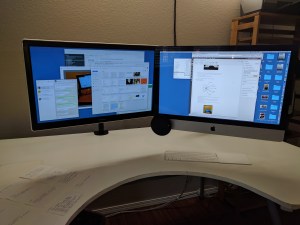
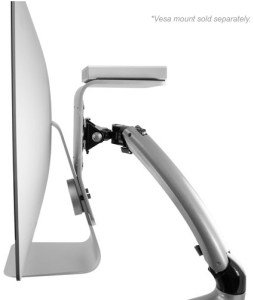
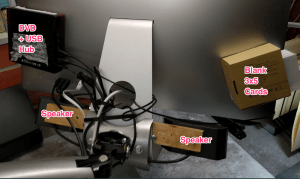
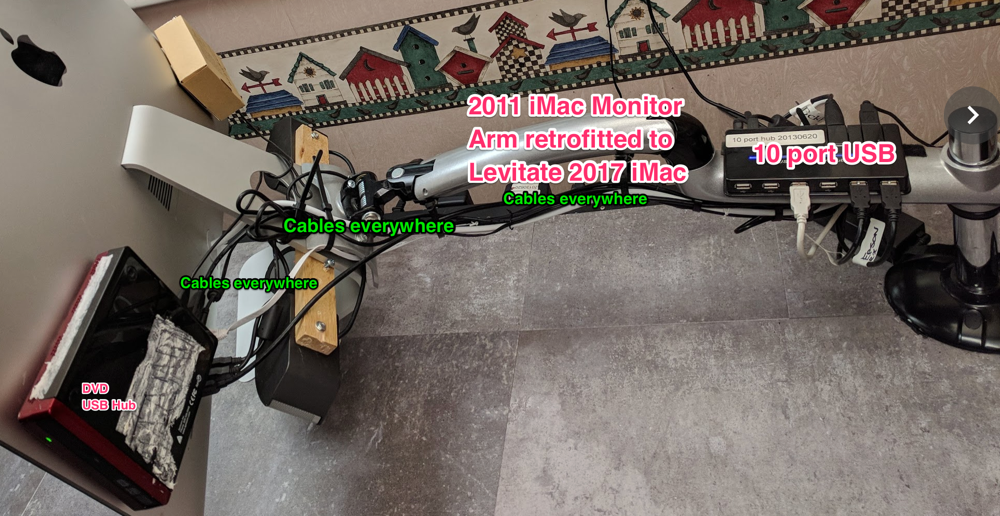
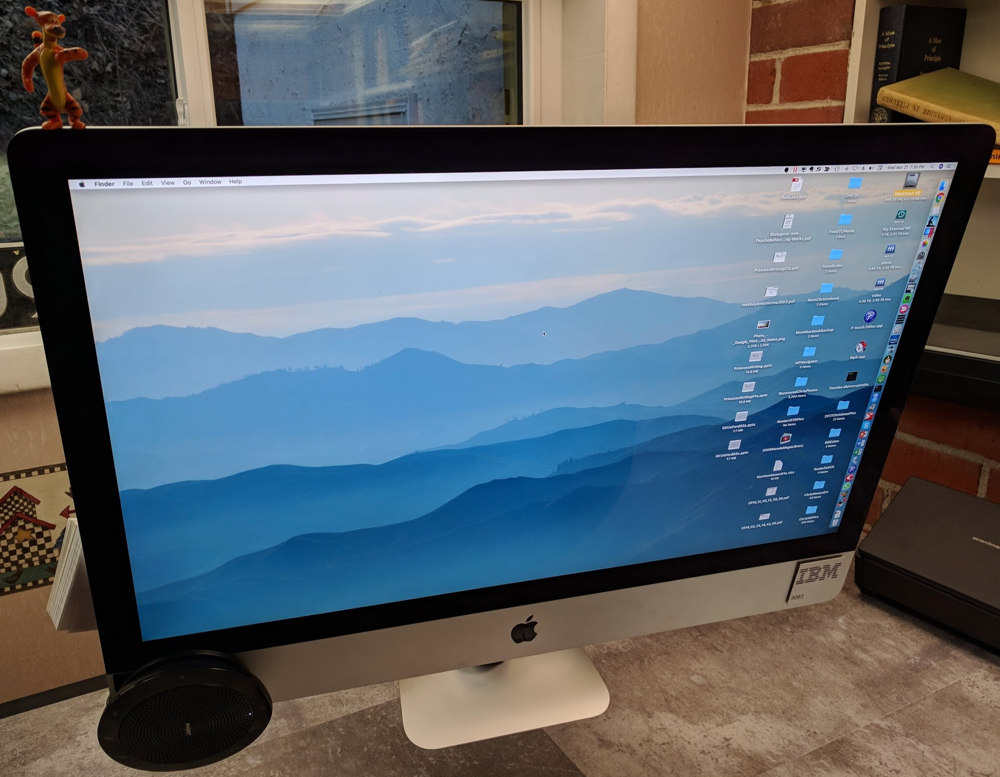
But, when I brought my repaired iMac home, I decided not to re-install the VESA adapter because I wanted to try a new way to mount my 27″ iMac since the newest generation of iMacs can only have their VESA adapters installed if you have a custom built unit.  That, and at 53 I’m tired of messing with anything but the most essential productivity areas of computers.  So, here is the picture of a direct mounted 75 MM bracket to my iMac’s stand:

D3M 6001

Now, here is a closer shot: 

D3M 6003

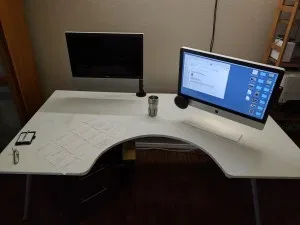
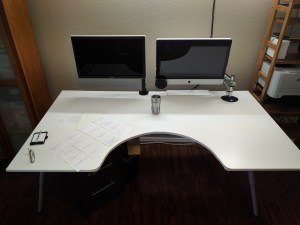
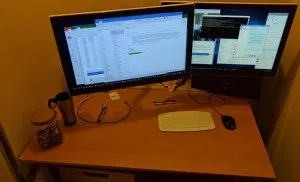
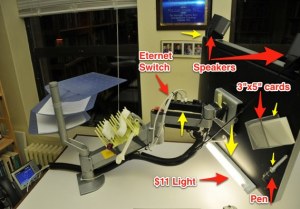
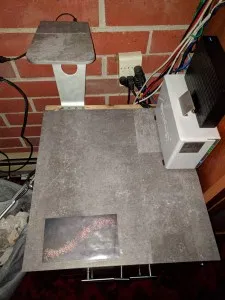
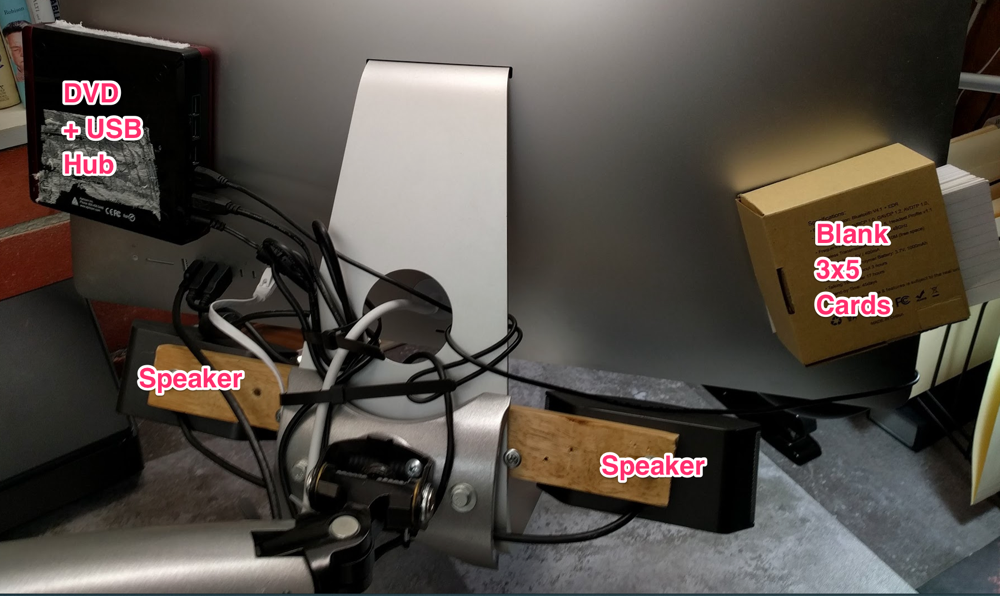
Ok, yeah, this is unorthodox.  But I was able to make it work because of the flexibility in the “neck” of the monitor stand, and the amazing flexibility of my Innovative Designs Giant Mamun (Henderson the rain king allusion) Monitor Arm.  So here is what the “dark side” of my GTD desk force looks like: 

D3M 5996

D3M 6000

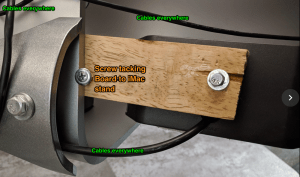
See how the monitor stand is tipped at almost a 45 degree angle so the base is out of the way?  This is the secret to being able to mount your monitor arm directly to your iMac’s stand. *Note* that I’ve elected to use drywall screws to force the monitor to stay tilted out at the bottom (no *flames* please).  

The holes in the monitor arm that the drywall screws are penetrating are there due to my efforts to repurpose the iMac stand in order to hold my most excellent Fujitsu Scanner above my desk.  Here’s a refresher link and picture: 

NewImage

With a closeup to the vertical holes on the upside down iMac stand:

NewImage

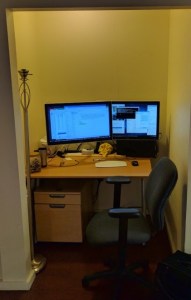
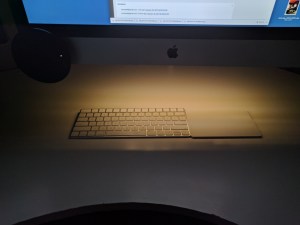
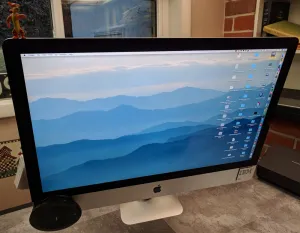
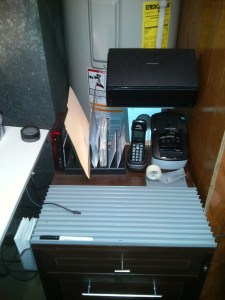
So, what does the iMac look like to work with?  Great question! Here it is: 

D3M 5991

D3M 5992

D3M 5993

D3M 5995

Anyone with a new iMac 27″ that wants to use the Innovative 7500-HD stand, drop me an email (bill@basicip.com) and I’ll be happy to converse with you and share.  

Bill Meade 


The Mess Is The Masterpiece

BernardPrasEinstein.jpg.png

Source: Bernard Pras via
AmusingPlanet.com

Introduction:

“I organize, therefore I am” but, … there is just no way to stay ahead of the mess.  Having just consolidated two offices with five thousand books into one office plus overflow into a 14 foot wall in the living room, I’ve been submerged for a month.  Purpose of this article is articulate some of the lessons learned in this personal “mother of all GTD re-organizations.” 

Lessons Learned: 

  1. Move first, organize after 
  2. Don’t over-think
  3. Get help from people three decades younger than you
  4. Remember problems are opportunities
  5. Let go of fear (that you will hate the office you end up with) 
  6. Organize in layers 
  7. These lessons apply in other domains

1. Move first, organize after  

It will happen whether you want it to or not.  When you move, you will reach the point where you need to get the atoms part over with, regardless of the consequences to your perfect GTD system.  Do not stress about this.  Just get the initial move over, and stack the boxes 2x higher than you think you need to in order to get everything in to the new place. 

Whenever I move my books I live for about an hour in a fantasy of how I will keep the books on the same book shelves before and after the move.  And further, keep the book shelves in the same order.  My library is 100% stored in stackable 3 tier collapsable book shelves.  I number the book shelves as 1 Lower, 1 Upper, 2 Lower, 2 Upper, etc.  And my theory is that I can mark these book case numbers on the boxes used to move the books, but it never works out.  My fantasy dies before the 3rd box of books is packed. 

I’ve decided to be good with this.  

Having disorganized books is a great opportunity to review your library (see 4 Problems are opportunities).  This time re-organizing, I’m pulling out all the books I’ve purchased but “not gotten to” and putting them into a single book case.  Concentrating these books has led to a reduction in stress.  ”To read” organized in one place, is an organized project. Organized projects are always less stress than dis-organized projects.    

2. Don’t over-think

NewImage

Source: XKCD.com

I am an over-thinker.  I thoroughly enjoyed reading WOMEN WHO THINK TOO MUCH by  Susan Nolen-Hoeksema.  Whenever you move, uncertainty is fanning the flames of over-thinking, over-forecasting, fearing-disasters, and over-working.  Uncertainty is just uncertainty, a temporary experience that will dissipate as you land and start bringing order to the chaos.  When you think you *might* be over-thinking, you ARE over-thinking.  Lately I’m using a trick to cut down on over-thinking: ask yourself what your friends would tell you to-worry-about or to-do.  Having just read DECISIVE by Heath and Heath I learned that thinking “outside-in” this way produces better results than thinking “inside-out” i.e., over-thinking.  

3. Get help from people three decades younger than you

They are altruistic enough to be happy to work for pizza.  They don’t make your father’s noise, when they pick up large boxes of books.  They seemingly never tire.  It is impossible for mere manual labor to discourage them.  Don’t be too proud, find their favorite pizza place and place your order. 

4. Remember problems are opportunities 

When I’m moving, the entire moving process I’m worried about how the organization at the end is going to turn out to be a disaster.  *Note* this has never been my experience when moving, but it is a constant gnawing fear while moving.  This time same as always.  However, being organized after the move, I’m loving my latest GTD organization more than previous iterations.  

5. Let go of fear (that you will hate the office you end up with) 

This is a big lesson learned for me. Of course it makes sense, when consolidating two offices into one, you have a bigger library of capabilities to draw on.  And when you move to a new space, there is always something better than the old space.  For example, my old space had poured concrete walls, very tough to hang things on. The new space is sheet rock which is easy to hang pictures and memorabilia.  

The “Where am I going to put all these books?” problem I feared while moving out, became the “Wow these books look great in the living room!” opportunity while moving in.  I was planning on putting the books in boxes in the garage, but my (angel) wife turned out to like them in her living room.  Wheew, dodged a bullet there. 

But, that is the point.  When you move and reorganize, you are always dodging bullets, you can always upgrade, you can always depend on your own (and your angel spouse’s) resourcefulness.  The longer I do GTD, the better I become at making a mess into a masterpiece.  

6. Organize in sequence-layers 

NewImage

Source: Flickr

Over the years I’ve had many grand designs for optimizing book organization:

  • favorite books within arms reach (visually overwhelming)
  • topical sections (econ, biographies, evolutionary ecology, statistics, etc.) OK, but not that helpful finding books
  • books related to a project in separate piles on the floor 

and many other organizations.  I think this time I’m going to not worry about an “optimal” book organization.  I’m going to let the books organize themselves over time.  Layer 1 was getting the books out of boxes and on to shelves.  Layer 2 was to “balance” out the books on shelves so that they are not packed so tightly as to be difficult to remove.  Layer 3 was to pull out those “aha!” books I’ve purchased because they flipped my “might be pivotal” mental switch.  Layer 4 will be to organize the “aha!” books into clusters of related books.  And … I don’t know what Layer 5 will be … yet.  

Looking back at my walk with GTD, I’ve been organizing in layers the entire time.  David Allen gives us a defined system to implement, and we dutifully make a try … fall short … and if we succeed in having a few aspects of David’s system stick, we move forward tinkering with experiments.  Every once in a while these experiments pay off big (my ginormous conference table desk for example) but most experiments are localize, small, and very focused.  For me, a small focused experiment was to get 100% of the clutter off my desk, out of where my eyes fall when I’m working.  

Over the 3.5 years I’ve been dong GTD the experiments have aggregated to a pastiche of techniques that work.  I’ve had failures (like going 100% into electronic GTD with Omni Focus which was too overwhelming) as well, and I’ve responded to them for the most part with 3×5 card kludges.  

7. These lessons apply in other domains 

“The mess is the masterpiece” occurred to me as I was talking down an overwhelmed entrepreneur a couple weeks ago.  The first problem is no sales, the second problem is gearing up for sales once they start coming, the third problem is living with how you gear up.  Entrepreneurs live in rolling messes, always struggling to keep up, and get results.  The artist Bernard Pras should be the Patron Saint of entrepreneurs.  His pieces like Einstein above, make masterpieces out of messes, just like successful entrepreneurs. 

And, just like people doing GTD.  GTDers not being wealth for the most part, have to make due with the messy pieces of organizing infrastructure that we have, and gradually over time we discover we can evolve the mess into a masterpiece that increases our productivity more than 2x.  And, let us not forget the reduction in stress from knowing our projects are planned out to next actions.  

Conclusions: 

Living through the cycle of organized to disorganized and back can be very stressful.  But, it does not have to be.  Much of the stress comes from over-personalizing change.  From interpreting change as punishment for lack of perfection.  But change is mostly temporary uncertainties piling up.  Looking back at moving changes, I can’t understand why I was so bent out of shape at the time of the moves.  This post is about lessons I’ve learned from my latest post-GTD move, and how I will attempt to preempt stress during future moves.  

bill meade 

Kindle A Cross-Platform Handcuff Experince

NewImage

Source: Microsoft

NewImage

Source: Harper’s

Introduction: 

As I’ve shared in previous posts, I’m a big Kindle fan.  I don’t own a Kindle device as I prefer to read on my iMac, iPad, and Google Chromebook, but I’m beginning to wonder if I should buy a Kindle Fire HD.  This post is a comparison of the Kindle reading experience across Mac, iPad, and Chromebook.  While highlights and annotations ARE SHARED across platforms, the fidelity of Kindle across these platforms is degrading over time.  

Best Kindle Platform to Read With: iPad

Of the three platforms I use, the iPad’s Kindle reader is head and shoulders better.  Here is a snapshot of the highlighting tool in Kindle for iPad.  Note the multiple colors to choose from.

NewImage

Source: A Kindle for iPad - A First Rate Madness page 78

Here are the annotation options on the Kindle for Mac software (version 1.10.5 (40381) freshly installed before I wrote this post.  

NewImage

Source: A Kindle for Mac - A First Rate Madness page 78

Here is the annotation option on the Google Chromebook using Amazon Cloud Reader: 

NewImage

Source: A Kindle Cloud Reader on Chromebook - A First Rate Madness page 78

Kindle iPad ≠ Kindle Mac ≠ Kindle Cloud Reader … So what? 

When I discovered the multi-color highlighting in Kindle for iPad, I thought to myself about how DICE (Deep Indulgent Complete and Elegant) Kindle’s software has become.  For example, here is a highlight that I created the first time I read A First Rate Madness:

NewImage

Source: A Kindle for iPad - A First Rate Madness page 78

 And here is an updated highlight that allowed me to separate the ideas I was pointing to in the passage: 

NewImage

 Source: A Kindle for iPad - A First Rate Madness page 78

The ability to more finely highlight for a bookworm like me, is a big deal.  As a professor, I’m looking forward to the day that Amazon will allow me to share my highlights with my students (and whomever else wants to see them) in a branded by me, way.  

However …

When I look at this same passage on Mac or Chromebook, the passage is one large blob of highlight.  So, … I’m now shifting my reading largely to my iPad, just so I can highlight in a more nuanced way.  And, I’m beginning to worry about whether … 

  • Amazon will preserve the integrity of my highlights into the future. 
  • I will be able to see my nuanced highlights on Mac and Chromebook, and if so, when.
  • I need to buy a Kindle Fire HD in order to avoid an adulterated Kindle reading experience. 
  • Google (resistance is futile, we will all be assimilated) will allow me to port my Amazon books to their reader with my highlights.
  • There will be an App for Kindle that will allow me to export my Kindle book highlights to a neutral format where I can re-apply my highlights to new formats of books that do not yet exist.   

Kindle as a GTD tool is incomplete.  I wish I could:

  • connect my highlighted passages to projects that the passages can support. Like I take my 3×5 cards with ideas on them and drop them into manila project folders.  It would be cool if I could print highlighted passages on 3×5 cards, so that I could move ideas from bits to atoms. 
  • link highlighted passages across Kindle books. 
  • have multiple Kindle books open on a single device, the digital equivalent of the bookworm on the ladder above.
  • dynamically link passages in Kindle books with web links (pictures, movies, slideshares, etc.)    

Finishing Up: 

Kindle is amazing, I’m sitting in my office surrounded by about 5,000 books.   So many books, that the thought of moving them actively repels me from the job market.  My computers running Kindle on the other hand, each have 215 books in them.  And, none of the devices carrying these books weigh any more than when I purchased them.  


NewImage

Source: Google Nexus 4 in my office

So, every format of content, has pluses and minuses.  But the lack of fidelity in Kindle software across hardware platforms, gives me pause about whether Kindle is really earning our patronage as the book of the future.  

The biggest bugaboo of Kindle across platforms is that text-to-speech is not available unless you are reading on a Kindle hardware device. I had previously written off ever having text-to-speech thinking that Amazon is trying to force users to buy their devices.  But when you compare Kindle software on non-Amazon hardware, it becomes clear that text-to-speech isn’t the only Kindle experience adulteration.  

Any RestartGTD readers who have a color Kindle device, if you could compare the highlighting colors between Kindle device and MS Windows Kindle, it would be good to know if my experience is isolated, or is a signal to a more widespread adulteration.  

bill meade 

Really nice post by Philipp Franziskus on creativity-boosting by decision-killing

Click here for the original, copied below:

Boost your productivity: kill some variables in your life

Boost your productivity: kill some variables in your life

After a long day of work I sometimes had this feeling that I had done a lot of things but nothing really important. I had made all these little decisions that take a fair amount of time and I felt exhausted. But my business didn’t move forward during that day. What was the problem?

A truly fascinating thing I have found to help me focus more on important tasks is killing some variables in my life.

Variables are usually recurring tasks that are not important but take a lot of attention because you have to make decisions. The more decisions you make the more you feel exhausted even when you actually didn’t do something important.

To keep my mind focused on my important goals, here are three things have worked well for me over the last years:

  • Food

Grocery-shopping normally takes hours and is a pretty redundant activity. I have a list of 5-10 items with exact quantities that I order online every week, for the last 6 to 7 years. A lot of whole-grain food, high-protein, low-fat, lots of vegetables and fruits as I am a little (or big) fitness-addict. It gets shipped to my door every monday. I open the door, put the food in the kitchen and that’s it. Total time this takes: 5 minutes with 0 decisions. Additional benefits: No lines, no waiting, no carrying, no impulse-buying.


  • Time-Scheduling

Another thing that takes your focus off of important tasks is not defining specific times for certain recurring tasks.

If you do e.g. sports on a regular basis I have found it to be inefficient to just “fit it in somewhere” during the day. This will move your attention away from what you are working on to thinking about when to do your activity for multiple times a day.

Schedule a time and stick to it. No need to waste important mind-power on this every day.


  • Clothes

The guys from Buffer, Joel Gascoigne and Leo Widrich, have a really cool concept of “minimalized clothes selection“. They each own only a handful of T-Shirts and jeans (one in fact!). This makes choosing clothes for the day easy so they can focus on their important tasks right from the beginning of the day. It is described in one of their videos here.


To me the concept of killing variables in your life looked like a creativity killer in the first place. It turned out to be the exact opposite, enabling creativity by leaving more room in your head (less decisions) and in your life (less time) to focus on your most important tasks.

Do you use similiar concepts to boost your productivity? What variables do you think take a lot of your attention away from your most important goals? I’d love to hear your thoughts on this!

Image-Credit: Kaynijo


Goofy paper tray quest …

NewImage

Source: Shaunfynn.com

Introduction:

I’ve got the upgraded/new desk, and I’ve got 3 paper trays behind the monitor where I can reach them easily but not see the clutter they generate.  But, … that is not good enough.  I want a kick ass/goofy paper tray like the Shaun Fynn paper tray I adapted to my office desk.  Only Shaun’s paper tray is no longer for sale.  

NewImage

Saun’s Goofy paper tray adapted by mounting it on the monitor arm on my office desk

I’ve been searching for “paper tray eye candy” “artisan paper tray” “wow paper tray” etc. and THERE IS NOTHING!!!  So, I’ve decided to reach out on RestartGTD.com for nominees for eye candy, artisan, and wow paper trays.  Co teaching rapid prototyping with John Niebergall last semester gives me CAD so I can show you some starter images of what I’m looking for: 

Screenshot 1 28 13 6 36 PM 2

View 1

Screenshot 1 28 13 6 36 PM

View 2

Screenshot 1 28 13 6 35 PM 4

View 3

As you can see from the 3 views, I’m looking for something goofy, something asymmetrical, something Frank Lloyd Wright falling-water looking, something Steve Jobs-ish.  And yes, “goofy paper trays” is yet another useless search.  

Got any links for me?  


bill meade 

Perfect GTD Desk +2: Desktopia Redux

D3M 5585

See also: The Perfect GTD Desk +1

See also The Abomination of Deskolation Redeemed 

See also: The Perfect GTD Desk

Introduction:

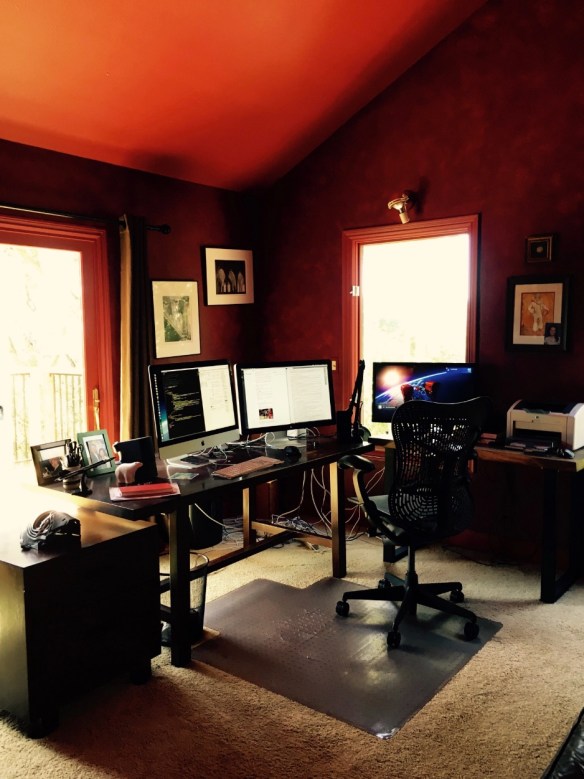
Perfect GTD desk +1 has been refactored once again.  The above action shot displays several changes:

  • The monitor arm has switched ends of the desk
  • The cable access door in the Ikea Galant Conference Table has been filled in with wood
  • Gave up on mounting the Fujitsu ScanSnap on the monitor arm.  It was cool to look at, but even cool stuff is clutter when you are trying to get work done.  So I resurrected a shipping box and mounted both the ScanSnap and the Brother label printer on the box.  So far so good, the box has not interacted with the chair legs.  
  • Screwed the chair mat to the floor in the correct location with 4 2″ drywall screws.  *Bam* no more wandering chair mat!!!
  • A 15.5″ semi-circle has been cut out of the center front of the conference table. 
  • To create a 15.5″ radius, the conference table was slid forward until the back edge of the desk was flush with the Galant support frame.  
  • I also slid the conference table surface to the right until the left edge of the work surface became flush with the left side of the Galant support frame.  Here’s an action shot of the top left corner of the desk:
  • D3M 5586


  • Power adapter moved from underneath the work surface to Galant table legs.  With diagonally crossing cable ties it was simple to mount the power adapter and then slide it around to readjust it.
  • A cordless remote control light switch was added (mid right hand of the back of the iMac) controlling the keyboard light, the floor lamp over the desk, and the floor lamp in the corner of the office. 
  • The “un-drawer” was shifted left and canted at a diagonal angle from lower left hand corner of the desk, to upper right hand corner.  This removes the un-drawer from constant collisions with knees.  
  • The purpose of the undrawer is to hold all the items that need to be at hand, but that clutter up the desk surface.  I have stapler, tape dispenser, utility knife, a 10 port USB hub, flash light, and my Plantronic USB headset (wireless headsets suck!).  
  • Action shots:
  • D3M 5589
  • D3M 5590


  • USB and power were added to the right hand end of the desk (form the semi-circle side of the desk).  While I wanted usb and power plugs available, I need them to be out of sight, and they can’t be mounted under the surface without cables working their way out with gravity.  So I turned both poet and USB adapters 90 degrees and mounted them with cable ties and cable tie anchors.
  • Action shot: 
  • D3M 5587 


Results: 

When I sit at my desk now, I’m in the semi-circle and can rest both elbows on the work surface at all times.  I can also reach a much larger proportion of the work surface.  I especially noticed the altered surface to volume ratio of the desk when I wiped it down with Windex to shoot the pictures in this blog post.  Standing in the semi-circle it is easy to wipe down the entire surface of the table.  

When people try the desk out, the first word that comes out of their mouths is “Game changer!” and then “I’m going to do this to my desk!”  

The monitor arm now swings the iMac completely out of the way of the desk.  Action shot: 

D3M 5591

 And when sitting at the desk, it looks like this: 

D3M 5584


How To Section: 

I started with this configuration: 

D3M 5567

This worked OK, except that it began to bug me that the cable access door in the work surface did not do anything.  If a feature is not doing work then it is clutter by definition.  So I stripped the monitor arm off the desk, removed the power outlet and the IKEA cable management baskets, and then the un-drawer which you can just see peeking out under the work surface by the red mouse.  

Then I detached the work surface, and laid under the desk sliding the surface to different places and then seeing how it *felt* from beneath and above the desk.  I had the idea to slide the desk forward and to the right to maximize the work surface overhang.  

Next I started drawing curves on the surface of the desk.  Because it is a whiteboard, I was able to draw, look, erase, redraw, and play with the shape in my mind.  I like the idea of reshaping the desk with bulbous organic curves at the corners like this: 

NewImageSource: Modenus.com

But, I was too chicken to cut very much out of the desk.  Because desks are experience goods, you can’t think your way to what you will love.  You have to generate and test.  So I decided to start simply with a semi-circle cut out.  Starting out the project looked like this (mr. batik supervising):

D3M 5576


D3M 5578

I decided to cut the cable access door plug from the semi circle and marked it with whiteboard marker.  Then I drew a 15.5″ radius semi-circle from the measured center of the front edge of the work surface.  Then cutting began with a jig saw and after the semicircle was cut out, I hustled the iMac back on to the left side of the desk this time.  I don’t know why I tried the left side of the desk.  Just happened that way.  At this point the project looked like this  

D3M 5580

Once I re-mounted the iMac on the monitor arm, I was delighted to see that shifting the work surface forward created an opening between the desk and the wall, that allows the iMac to swing behind the far edge of the work surface.  This leaves the work surface completely clear for jotting down ideas, spreading out 3×5 cards, etc.  I like the additional openness of this configuration over where I started from.  Gratifying to contemplate. 

At this point I cut a grommet hole out of the semi circle and then used steel straps to mount the cable access door plug and grommet hole plug from the under side of the desk.  Action shot (sorry it is blurry): 

D3M 5592

Then I filled in all the gaps around the plugs with white plastic wood which I was very delighted to discover at HomeDepot.com.  Much sanding and re-filling and re-sanding ensued. And once I got the work surface to be “not terrible” I moved on to finishing the edge the jig saw cut.  

I was surprised at how easily iron-on melamine edging went on.  Get a clothes iron, cut the length of edging you need, then slowly iron the melamine edge on to the work surface.  Took about 30 minutes from start to cleaned up.  And I’m very delighted with how the edging is staying attached.  

Partial component list for desk: 


Idea I Kno now, but did not Kno yesterday

NewImage

Source: 
http://lyndagrattonfutureofwork.typepad.com/.a/6a0120a6a171f6970c0133f64ea424970b-pi

See also yesterday’s post about Kno.com

Introduction:

In addition to allowing students/professors a context in which to catalyze the communion of kindred minds, Kno.com allows teams to do the same thing.  The team market is probably bigger than the text market by an order of magnitude (schools have students for educational life which for college is 4 years, work environments have people for their entire working lives which is about 40 years, thus a factor of 10).  

So what?

I remember reading in POST CAPITALIST SOCIETY (I *think*) about Drucker’s consulting clients going through his books page by page looking for tools that they could apply.  I’ve shared this idea with entrepreneurs who vehemently scoffed … on the way to crashing and burning.  Yes, it seems unlikely that a team could sit around a conference table and go through INNOVATION AND ENTREPRENEURSHIP say.  But Kno.com means that people don’t have to meet synchronously to share ideas.  Books can be downloaded to iPads, then read and marked up during travel, and then once back on the internet *foom* re-synchronized.  

Young whipper snappers could enter an entire back of envelope business plan into a book.  I once had a student who wrote a business plan and then gave a paper copy of the plan to his company president.  At a key point in the plan Mike inserted a $100 bill with a post it note on it that said “If you’d like to have about 30,000 more of these, keep reading!”  

What other uses for Kno.com in GTD and business?

  • Kno.com could sell businesses a subscription service to electronically share strategic documents requiring communion of kindred minds to make work.  The service could be a VPN within a business.  I wonder if SAP or Oracle would be interested in buying this document/thought linking capability?  
  • Kno.com could provide a back end linking service to connect from Kno.com markups in books and company documents, to Evernote, OneNote, OmniFocus, Remember the Milk, etc. I’m always writing notes to myself for raw materials to lecture on as I re-read my texts.  If I could simply access my Kno.com text markups while in PowerPoint, it would be a time saver for me.   
  • Books are reference materials, annotations of books being swept into Evernote (the world’s most perfect reference system) would be a huge win for me personally.  *Note* this blog post comes to you from an office with 5,000 books surrounding the author.  :-) 

Stay tuned!!!

I’m still early in my digestion of what Kno.com means.  I’m sure there will be more to come as I figure out how to run my GTD system pipes backwards with Kno.com.  

bill meade 


Kno.com: an eText Pane

NewImage

Source: geek.com

See Also this Kno.com post!

Introduction: 

I’ve just discovered kno.com and once again the internet surprises. I’ve got over 200 books in Kindle, I’ve got my classes running from Google Docs, and I thought I knew what an eText was. Alas, I did not kno.

Kno.com is an eText hosting web site. But more than being just another proprietary reader for eTexts, kno’s software use model turns texts into windows, and contexts. Let me explain:

Kno windows:

When I read a kno.com eText, I can, like in Kindle and Acrobat Pro, add web links, sticky note comments, and highlight text in multiple colors. So prepping a course text in the kno reader allows me to track my own train of thoughts as I read, to capture ideas about how to discuss the material with students during class meetings. Every book becomes a scrap book snap shot of my reading and thinking as I read. And the kno text allows me to recover the “situational awareness” I had while reading, when later I need to dip back into the book to set up a discussion. So I think of kno texts already, as windows that allow me to see further and more comprehensively.

Kno contexts:

But, it gets Kno better! In addition to allowing annotation and scrap booking of thoughts, there is a social media dimension to Kno. I can share my Kno eText markups with my students. And, my students can share their markups with me. Now, before this semester, I had never had the idea that it would be cool if my students could read a copy of their texts that is marked up by me. And the idea is still sinking in. But even within one week I’ve come to see how amazing this might be as a tool for me to catalyze student discovery.

Read the last paragraph again!

Ok, I probably didn’t get the magnitude of this idea across. So, let me try again. You know the scene in paper chase were Hart decides to read Kingsley’s student notebooks to get inside his imperious professor’s head? The video is on youtube and embedded here. Advance to about 6:20 in the video to watch the scene:

Source:

So, question, if the student is so “into” the content that s/he will break into the library to read the material, should we professors not make learning easier?

With Kno.com Kingsley could have annotated the contracts text with his own student journals, and every student in the class would have had unrestricted access to getting inside his decision cycle.

With my MBA students this semester, thanks to Kno.com, I have the ability to put all the key information I know, at the student’s disposal as s/he reads the text materials. They don’t have to read my view, Kno.com gives the student the option whether to subscribe or not. This is just a game changer for teaching. My texts should get better and better for students as classes repeat and the students and I traverse the Kno.com learning curve.

The transactions costs of mentoring students have just changed. Instead of interacting with students one by one and making my tool box of analytical models, historical events, and cross disciplinary reading available. I can now, get the materials I love in the subjects I love, captured where they are available to all.

This is just a HUGE deal for teaching online or on-ground.

The old joke “He makes a better door than a window, even though he is a pane.” is echoing in my mind. Kno is a pane where textbooks up until now have been doors.

bill meade

Perfect GTD desk +1


Screenshot 12 19 12 4 53 PM 2

Introduction:

Confession:

I’ve been holding out on http://RestartGTD.com.  :-(

I’ve been working since April 2012 on a successor to my “The Perfect GETTING THINGS DONE (GTD) Desk” post (which is the most read post on this blog).  1.5 years after we moved to the Portland area, Beth and I bought a house which allowed significant expansion of the good enough home office desk.  

As a sufferer of chronic rhinosinusitis, I’ve found the need to keep facial tissues close at hand.  In fact, VERY close at hand as tissues go from box, to my face, to the trash in one choreographed motion.  So in the new house I have a GTD trash can.

And

my desk work surface is expanded from a merely “big” desk into an “Ikea conference table” sized desk that is 77″x43″.  I bought yet another Innovative 7500-HD-1500 monitor arm to hold up my 27″ iMac i5. I know that $260 for an arm seems exorbitant, but getting the computer off the desk is the best money you can spend in taking back your desk.  

Also, if you’ve got a wall that you are facing when you work, you can get a monitor arm for $30 that will be great for giving you back your desk.  

Anyway, to be optimal, I should have gone to IKEA and bought a conference table surface for $65 in the “as is section” but, I did not realize that the components I needed for my upgrade of ”The Perfect GETTING THINGS DONE (GTD) Desk” would be available in the as-is department.  So, instead of saving 35%, I bought the full price $229 brand new white GALANT conference table (instead of the $65 as is white conference table).  I bought new adjustable Galant A-legs for $15 each, but in thinking about it I could have gotten away with buying 2 new fixed length Galant A-legs for $10 each and then 2 adjustable legs. 

Screenshot 12 20 12 11 17 AM 2

Driver’s eye-view of the Perfect GTD desk +1 

OK Bill, what is behind the monitor? 

Screenshot 12 19 12 5 35 PM

Well, as usual, there is a lot going on behind the iMac.  I’ve used cable ties to attach a 3-tier paper tray to the Innovative hd monitor arm.  *Note* because the iMac and paper tray are hanging off the monitor arm, there is an angle that I had to compensate for with the paper tray.  Why? Because if you can’t get the paper tray approximately level, then you’ll have paper splashing on to your work surface.  = Unpleasant.  Here is a shot of the angle compensating cable tie.  

And the indispensable ScanSnap S1500 rests on the base of the monitor arm. It is visible, but not when I’m looking at 3×5 cards on my desk.  

Screenshot 12 19 12 5 46 PM

OK, what is going on under the desk 

Excellent question!  Here is a macro shot of the under side of the desk: 

Screenshot 12 19 12 6 00 PM

Once again I’ve availed myself of IKEA to provide pseudo drawer space as well as plain Signum cable management (US$10).  The Galant cable management tray (US$5) works as a static drawer.  Desk tools that conventionally clutter up desk surfaces are verboten in my conception of the perfect GTD desk.  So, I mounted the Galant cable tray a bit back from the front of the desk (to avoid hitting it with my knees), but still in easy raeachability. 

In addition to microfiber cloth, stapler, and tape dispenser which are immediately available, I also keep a pocket knife and an eraser readily at hand.  

Crayons?  You think Crayons are cool?  

Well, in short, … I don’t know what to think about crayons.  Crayons come with memories, fun, and … crayon mess:

NewImage

Source: MissionMission.org

which … I’d forgotten about since I was 5.  But, still, writing on an IKEA conference table with Crayons™ is a great option if you are into crayons.  They come off with Scotch-Brite No SCRATCH sponges and Windex.   

Screenshot 12 20 12 11 34 AM

Crayon mind mapping
(about moving ERP into b-education)
48 years after giving up crayons! 

I felt giddy playing with crayons as a 53 year old!  The crappy wax mess that falls off the crayons, the problem of sharpening a crayon, the inevitable anger resulting from trying to sharpen a crayon in a pencil sharpener, the flash back to the 64 crayon set that had a sharpener in it (At least until you broke the first crayon off).  I found myself thinking about all the downsides of crayons as a dumb smile came over my face and I created a complex mind map that felt “just a little bit permanent.”  

Buy crayons, write on your IKEA conference table, undo all the art formerly-known-as-damage, with a Scotch-Brite pad and Windex.  Fondly remember the voice of your mom yelling at you about using crayon on the table/wall/sibling.  You own the conference table, you can do with it whatever you want!!  Fun memories! 

Improvements

First and foremost, except for legs, you can make-do in building your desk by shopping the AS-IS department at IKEA.  This will peel about 35% off the total cost.  

Second: grommet management.  Move the grommets away from where you will work most at your desk.  For me that is working at the computer.  And, place Signum cable grommets out of sight if you can.  You can’t control where the cable runs are, but you can control the wires between cable runs and move them out of sight.  

Screenshot 12 20 12 11 22 AM 2

Third: Find a work surface that does not have a pre-cut grommet in it.  I like the simplicity of IKEA parts, but I was forced to remove the monitor arm and re-place it through the steel support deck, because the particle board of the surface was not able to carry the 50 pound load of the monitor arm and items hanging from it.  

Thank you.  Thank you.  Thank you for 2012!!!

So we are just almost exactly at 1 year into http:restartgtd.com and about 130,000 page views.  The blog really started with the ”The Perfect GETTING THINGS DONE (GTD) Desk” post which Lifehacker kindly picked up, and we are about at the end of the year with this Perfect GTD desk +1 post.  I’d like to thank everyone who has read, everyone who has commented, and especially everyone who has emailed back channel to bill@basicip.com this year.  I’ve had a blast opening my GTD kimono.  And it has been fun sharing the GTD love and enthusiasm with you.  

May this year bring a happier, more robust recovery, and smarter GTD thinking than any year going before.  You guys reading this rock.  Let me know how I can help in 2013! 

bill meade 


Musings on eighth grade organizing …


NewImage

Source: 
http://blog.coasterradio.com
 

Introduction:

THE NEW YORK TIMES has a curious article: Working From Home, Without Sideshows, today.  

 Work OR Home?

From a GTD perspective, this OR dichotomy *feels* odd.  The GTD perspective on where to work is not an OR.  GTD is AND.  As in, how do I work at the office, and at home, and on the way between office and home, and when I’m at any phone, and when I’m at any computer, and …  Which is to say, all the places in our lives and moving among them, are interruptions to work that we must pre-organize our GTD selves in order to work around, in, over, under, and through.  

Now while I feel like a robot for looking at the world as a place to work rather than play, GTD has allowed me to feel less stress and live with increased happiness, because I am in harmony with my American cultural programming to work, work, work.  But more sanely, GTD has allowed me to sneak fun into my work in many new ways, so GTD has an impish rebellion component as well as the Protestant Work Ethic component.  

StettsonHillsSchool8th.png

Source: Stetson Hills School

Work or Home, todo list, checking off todo list, the NYT article is written from what I have come to see as the “eighth grade school of productivity”.  

  • Make an outline of the work you need to do.  
  • Letter the projects in capitals, 
  • then break down the projects into sub-steps 
  • and number them.  
  • Underneath the numbers use lower-case letters, etc.  

This “work is accomplished by sitting along and developing documents” paradigm was the crowning achievement of my eighth grade year at John A Hannah middle school in East Lansing Michigan.  

Screenshot 12 16 12 12 42 PM

Microsoft Word = Eighth Grade Thinking With Unlimited Money Pushing From Behind
*Note: the outlining in Word has never worked* 

Home offices then are most productive when optimized for the eight grade approach to work: 

  • Separate space to work that “sets a tone that says ‘work happens here.’ -Angie Mattson
  • Rules with significant others to prevent interruptions -Angie Mattson
  • Organized work space “If your work space is cluttered, your mind is cluttered” -Janet Bernstein 
  • “Your desk … should only have the essentials you need….”-Janet Bernstein
  • “Don’t work in pajamas or sweats…” -Janet Bernstein
  • “Build the kind of accountability found in traditional offices” -Jason Henham
  • “Create a to-do list for the day and cross each task off as you do it.” -David Smith 

But, … but … but … 

While I adhere to most of the above bullet points, the idea that a grown person’s organization can be improved by re-voicing the eighth grade perspective on productivity and adding new bullet items, is bogus.  When working adults talk about productivity by going back to the eight grade productivity model, we don’t learn.   

How can you say that?  

Because one of the fun things I’ve learned about Getting Things Done by helping people get started with GTD and Get restarted with GTD, is that school teachers are very disorganized.  

DisorganizedTeacher.png

Source: After Kutscher & Moran

Not out in the open, but in inner mental lives, and most aggravatingly for GTD parents, in organizing infrastructure.  Now, before you launch the flame to bill@basicip.com, let me say, “thou teachers do protest too much”.  I’m actually not in the ballpark of criticizing teachers with this comment.  Instead, I’m replaying comments of my public school teaching clients.  Many public school teachers have abominations of deskolation organizing infrastructures.  

And I think this outside of the cup neatness vs. inside the cup chaos is part an parcel of the eighth grade organization model that is the default organization taught in US schools.  

Think about it, the reason that GTD was different when you were first exposed to it, was that it was not an 8th grade step-by-step process, or a list of platitudes to crank up self-control.  Instead, GTD is a system.  A system plus a workflow template that works end-to-end.  Even more in that David Allen has refined GTD over decades, with hundreds of users.  

Another contrast between 8th grade organizing and the real world is given by looking at what eighth grade organization training did not provide: 

  • An organized infrastructure for doing knowledge work that is larger than 1 notebook
  • Something along the line of David Allen’s “trusted system” 
  • A-Z filing 
  • Capturing all sources of important documents 
  • Paper
  • MS Office documents 
  • Web pages
  • eMail 
  • Illustrations 
  • How to think with paper
  • working out ideas via draft after draft of writing, vs, working out ideas with meta-writing tools like: 
  • Given a set of facts, create a powerpoint in 2 hours to present the story of the facts, as coherently as possible
  • Fill in gaps with assumptions, and document each assumption
  • How to take an organization for a project, and then evaluate what is missing and what is un-necessary
  • How to apply common sense in the face of “groupthink” and “Abeline paradox” pressures in groups
  • How to distinguish important knowledge gaps from trivial gaps 
  • How to think for oneself about what is necessary and what would be “nice to have” 
  • How to do “raiding party” research to fill in important gaps
  • How to confront fear of criticism in a group, think for oneself, and then opportunistically obtain information
  • How to divide up research across a team
  • Matching people with passions
  • Helping team members get over paralysis through analysis 
  • Using the network of all team members to find “hot” information

Enough Musings What Was Cool in the NYT piece? 

The links in the article were very interesting in a GTD-way.  In particular I liked Janet Bernstein’s web site questionnaire

Screenshot 12 16 12 4 45 PM

“Clutter words” like: overwhelmed, frustrated, procrastinate, embarrassed, lack of organization, stepping stone their way across the questionnaire.  

I thought it was Fun-ronic (fun+ironic) that the organizers had broken/empty links in their web sites on the big day of a NYT article.  This is a goof that I would make!  Sign of genius! 
 

Screenshot 12 16 12 4 46 PM

Source:  
http://yourorganizedguide.com/
 

Screenshot 12 16 12 4 49 PMSource:
http://www.slate-consulting.com/lovingly-brutal/


Hope this was enjoy able! 

bill meade