Perfect GTD Desk +2: Desktopia Redux

D3M 5585

See also: The Perfect GTD Desk +1

See also The Abomination of Deskolation Redeemed 

See also: The Perfect GTD Desk

Introduction:

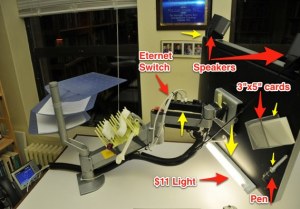
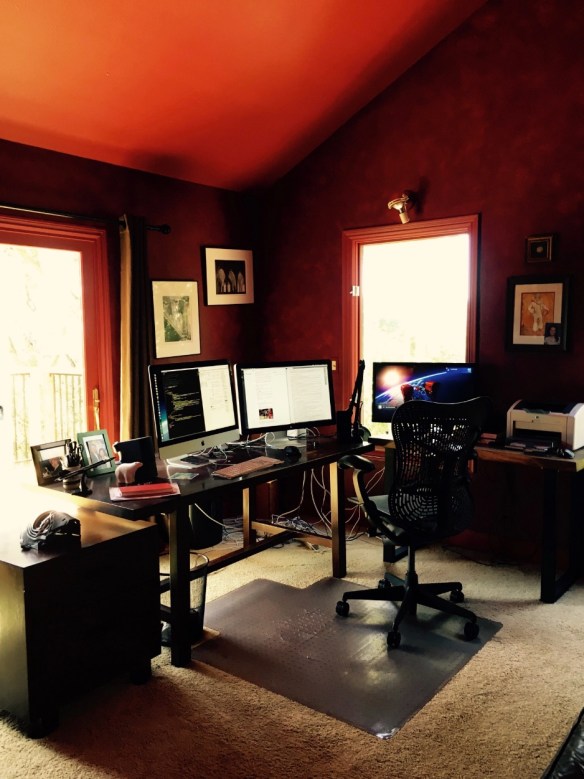
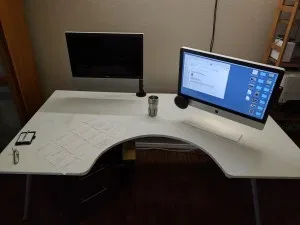
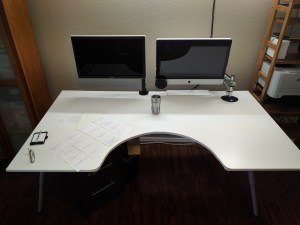
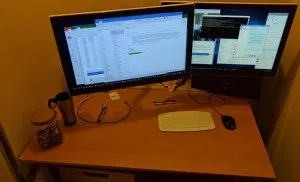
Perfect GTD desk +1 has been refactored once again.  The above action shot displays several changes:

  • The monitor arm has switched ends of the desk
  • The cable access door in the Ikea Galant Conference Table has been filled in with wood
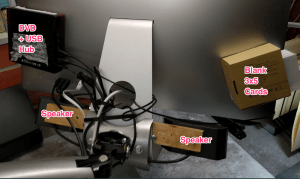
  • Gave up on mounting the Fujitsu ScanSnap on the monitor arm.  It was cool to look at, but even cool stuff is clutter when you are trying to get work done.  So I resurrected a shipping box and mounted both the ScanSnap and the Brother label printer on the box.  So far so good, the box has not interacted with the chair legs.  
  • Screwed the chair mat to the floor in the correct location with 4 2″ drywall screws.  *Bam* no more wandering chair mat!!!
  • A 15.5″ semi-circle has been cut out of the center front of the conference table. 
  • To create a 15.5″ radius, the conference table was slid forward until the back edge of the desk was flush with the Galant support frame.  
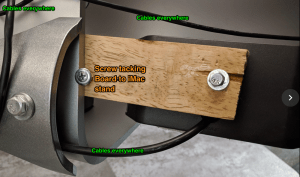
  • I also slid the conference table surface to the right until the left edge of the work surface became flush with the left side of the Galant support frame.  Here’s an action shot of the top left corner of the desk:
  • D3M 5586


  • Power adapter moved from underneath the work surface to Galant table legs.  With diagonally crossing cable ties it was simple to mount the power adapter and then slide it around to readjust it.
  • A cordless remote control light switch was added (mid right hand of the back of the iMac) controlling the keyboard light, the floor lamp over the desk, and the floor lamp in the corner of the office. 
  • The “un-drawer” was shifted left and canted at a diagonal angle from lower left hand corner of the desk, to upper right hand corner.  This removes the un-drawer from constant collisions with knees.  
  • The purpose of the undrawer is to hold all the items that need to be at hand, but that clutter up the desk surface.  I have stapler, tape dispenser, utility knife, a 10 port USB hub, flash light, and my Plantronic USB headset (wireless headsets suck!).  
  • Action shots:
  • D3M 5589
  • D3M 5590


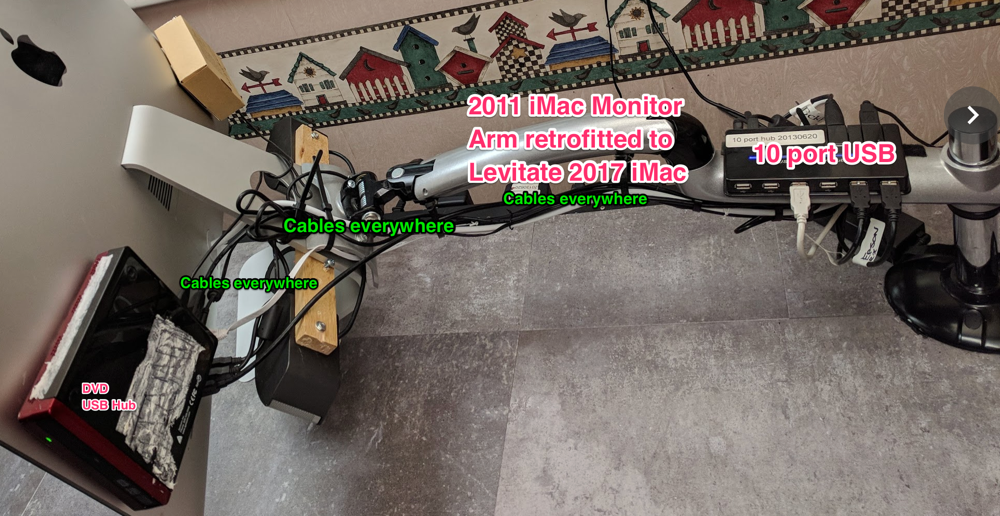
  • USB and power were added to the right hand end of the desk (form the semi-circle side of the desk).  While I wanted usb and power plugs available, I need them to be out of sight, and they can’t be mounted under the surface without cables working their way out with gravity.  So I turned both poet and USB adapters 90 degrees and mounted them with cable ties and cable tie anchors.
  • Action shot: 
  • D3M 5587 


Results: 

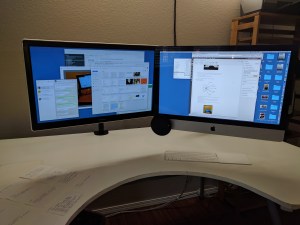
When I sit at my desk now, I’m in the semi-circle and can rest both elbows on the work surface at all times.  I can also reach a much larger proportion of the work surface.  I especially noticed the altered surface to volume ratio of the desk when I wiped it down with Windex to shoot the pictures in this blog post.  Standing in the semi-circle it is easy to wipe down the entire surface of the table.  

When people try the desk out, the first word that comes out of their mouths is “Game changer!” and then “I’m going to do this to my desk!”  

The monitor arm now swings the iMac completely out of the way of the desk.  Action shot: 

D3M 5591

 And when sitting at the desk, it looks like this: 

D3M 5584


How To Section: 

I started with this configuration: 

D3M 5567

This worked OK, except that it began to bug me that the cable access door in the work surface did not do anything.  If a feature is not doing work then it is clutter by definition.  So I stripped the monitor arm off the desk, removed the power outlet and the IKEA cable management baskets, and then the un-drawer which you can just see peeking out under the work surface by the red mouse.  

Then I detached the work surface, and laid under the desk sliding the surface to different places and then seeing how it *felt* from beneath and above the desk.  I had the idea to slide the desk forward and to the right to maximize the work surface overhang.  

Next I started drawing curves on the surface of the desk.  Because it is a whiteboard, I was able to draw, look, erase, redraw, and play with the shape in my mind.  I like the idea of reshaping the desk with bulbous organic curves at the corners like this: 

NewImageSource: Modenus.com

But, I was too chicken to cut very much out of the desk.  Because desks are experience goods, you can’t think your way to what you will love.  You have to generate and test.  So I decided to start simply with a semi-circle cut out.  Starting out the project looked like this (mr. batik supervising):

D3M 5576


D3M 5578

I decided to cut the cable access door plug from the semi circle and marked it with whiteboard marker.  Then I drew a 15.5″ radius semi-circle from the measured center of the front edge of the work surface.  Then cutting began with a jig saw and after the semicircle was cut out, I hustled the iMac back on to the left side of the desk this time.  I don’t know why I tried the left side of the desk.  Just happened that way.  At this point the project looked like this  

D3M 5580

Once I re-mounted the iMac on the monitor arm, I was delighted to see that shifting the work surface forward created an opening between the desk and the wall, that allows the iMac to swing behind the far edge of the work surface.  This leaves the work surface completely clear for jotting down ideas, spreading out 3×5 cards, etc.  I like the additional openness of this configuration over where I started from.  Gratifying to contemplate. 

At this point I cut a grommet hole out of the semi circle and then used steel straps to mount the cable access door plug and grommet hole plug from the under side of the desk.  Action shot (sorry it is blurry): 

D3M 5592

Then I filled in all the gaps around the plugs with white plastic wood which I was very delighted to discover at HomeDepot.com.  Much sanding and re-filling and re-sanding ensued. And once I got the work surface to be “not terrible” I moved on to finishing the edge the jig saw cut.  

I was surprised at how easily iron-on melamine edging went on.  Get a clothes iron, cut the length of edging you need, then slowly iron the melamine edge on to the work surface.  Took about 30 minutes from start to cleaned up.  And I’m very delighted with how the edging is staying attached.  

Partial component list for desk: 


Perfect GTD desk +1


Screenshot 12 19 12 4 53 PM 2

Introduction:

Confession:

I’ve been holding out on http://RestartGTD.com.  :-(

I’ve been working since April 2012 on a successor to my “The Perfect GETTING THINGS DONE (GTD) Desk” post (which is the most read post on this blog).  1.5 years after we moved to the Portland area, Beth and I bought a house which allowed significant expansion of the good enough home office desk.  

As a sufferer of chronic rhinosinusitis, I’ve found the need to keep facial tissues close at hand.  In fact, VERY close at hand as tissues go from box, to my face, to the trash in one choreographed motion.  So in the new house I have a GTD trash can.

And

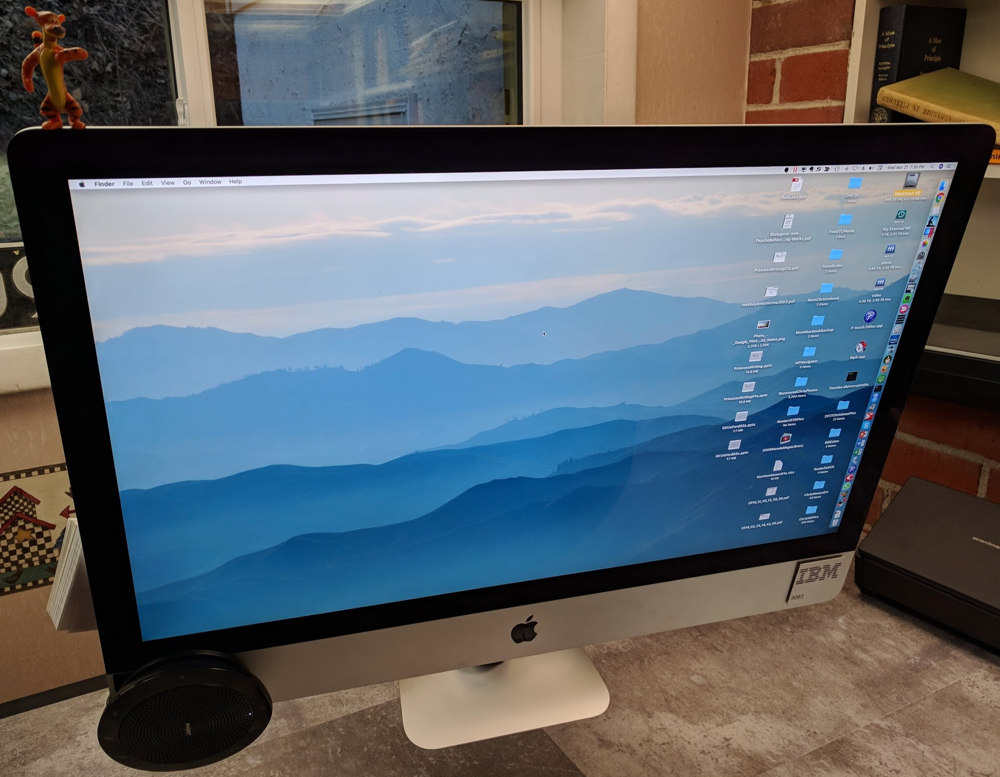
my desk work surface is expanded from a merely “big” desk into an “Ikea conference table” sized desk that is 77″x43″.  I bought yet another Innovative 7500-HD-1500 monitor arm to hold up my 27″ iMac i5. I know that $260 for an arm seems exorbitant, but getting the computer off the desk is the best money you can spend in taking back your desk.  

Also, if you’ve got a wall that you are facing when you work, you can get a monitor arm for $30 that will be great for giving you back your desk.  

Anyway, to be optimal, I should have gone to IKEA and bought a conference table surface for $65 in the “as is section” but, I did not realize that the components I needed for my upgrade of ”The Perfect GETTING THINGS DONE (GTD) Desk” would be available in the as-is department.  So, instead of saving 35%, I bought the full price $229 brand new white GALANT conference table (instead of the $65 as is white conference table).  I bought new adjustable Galant A-legs for $15 each, but in thinking about it I could have gotten away with buying 2 new fixed length Galant A-legs for $10 each and then 2 adjustable legs. 

Screenshot 12 20 12 11 17 AM 2

Driver’s eye-view of the Perfect GTD desk +1 

OK Bill, what is behind the monitor? 

Screenshot 12 19 12 5 35 PM

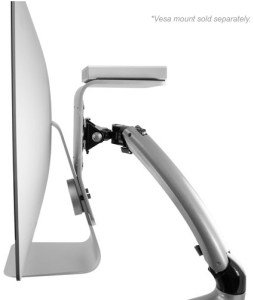
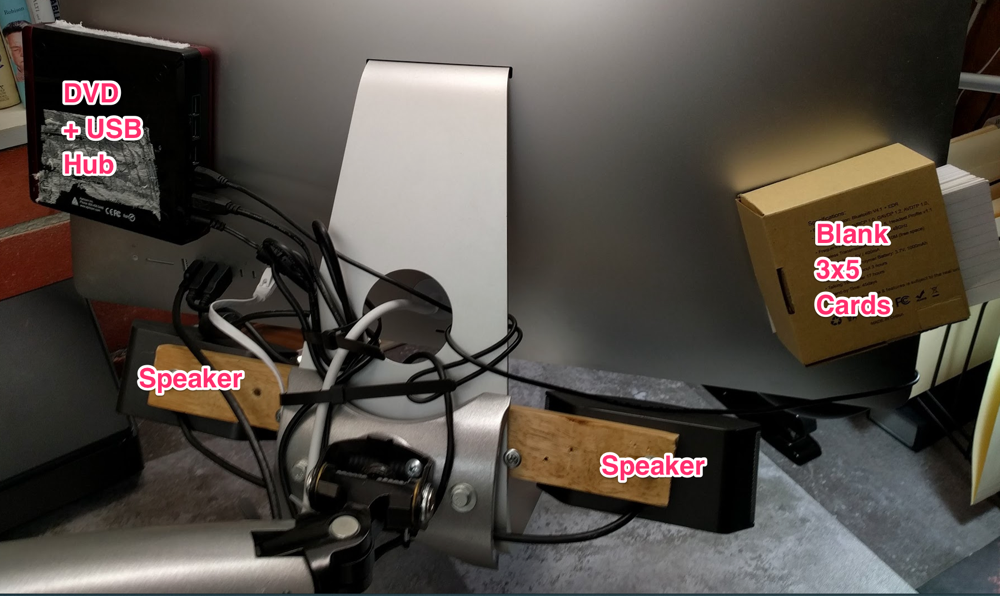
Well, as usual, there is a lot going on behind the iMac.  I’ve used cable ties to attach a 3-tier paper tray to the Innovative hd monitor arm.  *Note* because the iMac and paper tray are hanging off the monitor arm, there is an angle that I had to compensate for with the paper tray.  Why? Because if you can’t get the paper tray approximately level, then you’ll have paper splashing on to your work surface.  = Unpleasant.  Here is a shot of the angle compensating cable tie.  

Screenshot 12 19 12 5 46 PM

OK, what is going on under the desk 

Excellent question!  Here is a macro shot of the under side of the desk: 

Screenshot 12 19 12 6 00 PM

Once again I’ve availed myself of IKEA to provide pseudo drawer space as well as plain Signum cable management (US$10).  The Galant cable management tray (US$5) works as a static drawer.  Desk tools that conventionally clutter up desk surfaces are verboten in my conception of the perfect GTD desk.  So, I mounted the Galant cable tray a bit back from the front of the desk (to avoid hitting it with my knees), but still in easy raeachability. 

In addition to microfiber cloth, stapler, and tape dispenser which are immediately available, I also keep a pocket knife and an eraser readily at hand.  

Crayons?  You think Crayons are cool?  

Well, in short, … I don’t know what to think about crayons.  Crayons come with memories, fun, and … crayon mess:

NewImage

Source: MissionMission.org

which … I’d forgotten about since I was 5.  But, still, writing on an IKEA conference table with Crayons™ is a great option if you are into crayons.  They come off with Scotch-Brite No SCRATCH sponges and Windex.   

Screenshot 12 20 12 11 34 AM

Crayon mind mapping
(about moving ERP into b-education)
48 years after giving up crayons! 

I felt giddy playing with crayons as a 53 year old!  The crappy wax mess that falls off the crayons, the problem of sharpening a crayon, the inevitable anger resulting from trying to sharpen a crayon in a pencil sharpener, the flash back to the 64 crayon set that had a sharpener in it (At least until you broke the first crayon off).  I found myself thinking about all the downsides of crayons as a dumb smile came over my face and I created a complex mind map that felt “just a little bit permanent.”  

Buy crayons, write on your IKEA conference table, undo all the art formerly-known-as-damage, with a Scotch-Brite pad and Windex.  Fondly remember the voice of your mom yelling at you about using crayon on the table/wall/sibling.  You own the conference table, you can do with it whatever you want!!  Fun memories! 

Improvements

First and foremost, except for legs, you can make-do in building your desk by shopping the AS-IS department at IKEA.  This will peel about 35% off the total cost.  

Second: grommet management.  Move the grommets away from where you will work most at your desk.  For me that is working at the computer.  And, place Signum cable grommets out of sight if you can.  You can’t control where the cable runs are, but you can control the wires between cable runs and move them out of sight.  

Screenshot 12 20 12 11 22 AM 2

Third: Find a work surface that does not have a pre-cut grommet in it.  I like the simplicity of IKEA parts, but I was forced to remove the monitor arm and re-place it through the steel support deck, because the particle board of the surface was not able to carry the 50 pound load of the monitor arm and items hanging from it.  

Thank you.  Thank you.  Thank you for 2012!!!

So we are just almost exactly at 1 year into http:restartgtd.com and about 130,000 page views.  The blog really started with the ”The Perfect GETTING THINGS DONE (GTD) Desk” post which Lifehacker kindly picked up, and we are about at the end of the year with this Perfect GTD desk +1 post.  I’d like to thank everyone who has read, everyone who has commented, and especially everyone who has emailed back channel to bill@basicip.com this year.  I’ve had a blast opening my GTD kimono.  And it has been fun sharing the GTD love and enthusiasm with you.  

May this year bring a happier, more robust recovery, and smarter GTD thinking than any year going before.  You guys reading this rock.  Let me know how I can help in 2013! 

bill meade 


On In box to-do lists and over engineered organization

NewImage

Introduction: 

I came across a provocative post by Paul Kortman on Boomerang, an add-in for Gmail that facilitates using your email in-box as a todo list.  The “boomerang” idea is that you can:

Screenshot 11 21 12 10 24 AM 2

Source: Boomerang

In his post, Kortman talks principally about using boomerang’s 2nd feature above, sending email away to return to your inbox at a later time.  Like, … a “snooze” alarm for items that can’t be acted on immediately.  

Here is what Boomerang looks like when you install it (see Appendix A below for installation instructions): 

Screenshot 11 21 12 10 37 AM


Screenshot 11 21 12 10 37 AM


Screenshot 11 21 12 10 38 AM


Screenshot 11 21 12 10 39 AM


Screenshot 11 21 12 10 39 AM

What is the GTD angle? 

That Boomerang is yet another tool.  Something to experiment with to prototyping more efficient ways of working.  

What should my email look like? 

Good question.  The orthodox GTD answer would be to be regularly getting to in-box zero.  I find myself however, gradually drifting further and further from inbox zero (right now I’m at inbox 536) without feeling stressed or becoming preoccupied with what is in my inbox.  

The actual next actions list that I’m using is not kept in email, it is kept in my OmniFocus inbox in: Vacation, Today, This Week, This Month, Eventually buckets:

Screenshot 11 21 12 10 45 AM

 Since adopting this organization scheme from Salvatore antirez Sanfilippo my email box has become something of a ….

NewImage

Source: Apartment Therapy

Yes, my email has become a junk drawer.  And the strange thing is, I don’t feel bad in a “clutter” way about it.  I pass into and out of my email all day, put the stuff that matters into my Daily/Weekly/Monthly/Eventually buckets (Vacation exists this week because I have it off school and have out-of-routine things I’d like to get done). 

Heresy! 

Maybe, but, I don’t think so.  In the cause of being “just organized enough” I’ve let my inbox go to seed.  I’m getting everything done, I’m experiencing mind like water, I’ve just reached the point where keeping the inbox empty, *feels* like drone work.  

Heresy!

Maybe.  But email imposes so much overhead.  What overhead?  Well, for example, when you reply to an email, 99% chance that the email you replied to should drop itself into the @Read folder. Right?  But that does not happen.  We have to manually rake back through the inbox and waste motions tracking down and filing messages.  What is worse is that when someone replies to your reply, the entire message thread will pop itself back into the inbox.  Bother.  

More and more, I’m beginning to think that Google is on to something with search.  :-)  That I’ll be better off just searching the junk drawer for the items I know are in it, rather wasting effort on over-engineered organization.  The distinction between @Read and Inbox is loosing its difference to my mind.  

The acid test: 

For me, the acid test of newly configured organizing tools is whether they feel like clutter.  And my junk drawer inbox does not feel like clutter.  I’m not preoccupied with it because I’ve raked out the important stuff and stuck it in Daily/Weekly/Monthly/Eventually buckets.  

All the action in my inbox takes place at the top, and I find myself not really caring about how long the stack of messages is.  Where before GTD I panicked at lots of email messages, today I don’t,  I know I’ve got all the essentials covered.  And I hate wasting time organizing just to look organized.  A junk drawer inbox works, … for me.  And, I’m going to say “This is OK.”  

I may try Boomerang, but I’m an oldster, I like having my email on all my computers safely in IMAP.  I’d have to switch to Gmail on line if I fell in love with Boomerang.  We’ll see if that happens.  

bill meade 

APPENDIX A: HOW TO INSTALL BOOMERANG In Chrome

Step 1: Open your browser and log in to your Gmail account 

Step 2: Go to \Chrome\Preferences\Extensions and click on “Get more extensions” 

Screenshot 11 21 12 11 17 AM

Step 3: Type “boomerang” into the search box and then click the “+ ADD TO CHROME” button to the right of boomerang.

Screenshot 11 21 12 11 18 AM 2

Step 4: Then click the “Add” button in the lower right hand corner 

Step 5: Go back to the tab where your Gmail is open, and click “refresh” 

You should now have Boomerang working.  Click compose and look for the Boomerang line at the very bottom of the message (on the new compose dialog in Gmail).  Click here for Boomerang help.  


Side Projects: Garden of Slow Reflections

NewImage

Source: thehungercoalition.org

Introduction: 

Reading Daniel Tenner’s blog about side projects today, I had an uncharacteristic feeling of “Hmmmm.”  I have 3 of Daniel’s blog posts in my Evernote reference files at present.  The first was about picking technologies, the second was a delightful parable of “The salesman and the developer” and the third was about “How to hack the beliefs that are holding you back.”  Something I need to re-read in light of the RestartGTD conversation with Austrailia.  

All of which is to say that generally when I read Daniel, I think “Dang!  I wish I had blogged that!”  Not today however.  Today I think Daniel did not go far enough.  W00t! An opening for me to build on swombat.com!!!

Daniel’s post was building on a Post by Andrew Dumont that takes a hard line on side projects.  The hard line might be summarized visually as:

Screenshot 11 6 12 11 27 AM

Source: Telegraph.Co.UK

See also: bentobjects.com

Here is the textual representation: 

Know that when you start just a side project, you’re starting so much more. It’ll completely consume you. The worst failure in any side project is to devote time, energy and sanity for any sustained period only to close the doors.

Side projects are a means to an end.

They need to start with an end-state in mind – create a passive income stream, validate my idea. They need to have deadlines and key metrics – six months to profitability, 10 paying users to validate my idea. But most importantly, they need to be a sprint. The longer a project lingers, the harder it becomes to keep morale high and pull the plug if it’s not working out.

Now, interpreting this passage as a blanket statement on side projects is taking Mr. Dumont out of context.  Andrew is talking about startup founders getting distracted by side projects.  A serious problem for burned out minds.  And, in his tweeting Andrew pointed out a FANTASTIC Scott Belsky essay “What Happened to Downtime? The Extinction of Deep Thinking & Sacred Space” so the above is not warmongering to extinguish side projects.  

But, it does represent a left-brained view of managing work that has become the defacto politically correct way to reason, in work groups lacking trust.  So, I liked it when Daniel took (slight) exception to Andrew’s hard line saying But if you want to start a side-project today for the heck of it? Go for it.“ 

Daniel did not go nearly far enough for my tastes, which was my problem really.  But the itch created by Andrew and Daniel got me thinking about GTD and my side projects.  

The purpose of this post is to take side project ideas, immerse them in the GTD amniotic fluid, and use them to explore “side project GTD thinking.”  

GTD of Side Projects

For me, GTD side projects have been a great source of mental unburdening.  For each side project I make a manilla folder and then gather 3×5 cards and letter pages with thoughts about the side project.  Side projects started as a way to mind sweep more fully.  I did not like having isolated cards with ideas that clumped together.  So just to get the ideas off my mind I would clump them into folders.  And then, I group folders into Target Totes (see before/after and scroll down).  

When I listened to GTD and David Allen said “most people have 100 projects going but can recall only” 7+/-2, it rang true with me.  Except, I think I have way more than 100 projects going.  And these projects are not all what I’d call “core” to my work.  Many of them are projects that my brain thinks up and won’t let go of until I write them down.  

After 3 years of GTD however, I notice that side project folders have a tendency to evolve into core, focused, time-constrained projects.   When I realize that a side project is now a “core” project, I sit down in my school office, a clear desk, and the folder with the accumulated detritus of cards and pages, and then a sense of calm comes over me as I see that all the ideas my brain trusted me with, are all accounted for.  

I’ beginning to be convinced that side projects that my brain wants to build, but that do not do work for me today, are a kind of “over the horizon” work radar.  By teaching me mind-sweeping and organizing, GTD has made it possible for me to have the idea in the previous sentence. 

Previous to GTD I would stop these side projects by feeling too guilty to do anything about then when I had “real work.”  The guilt kept over the horizon projects disorganized and stuffed into my overwhelmed brain.  Mind sweeping them out gave me back creative capacity.  Organizing over the horizon ideas converted randomness into a down stream GTD by product that I can use to further increase my productivity.  And, cut stress.  When you realize an over the horizon project has just landed in your lap, opening a folder to all your ideas in one place is the opposite of stress.  Prevents guilt from getting a toe-hold to derail the work.  

Or, so it seems…  

bill meade

If you’ve read this far (thank you Daniel Tenner!) you should follow RestartGTD’s rss feed.   

p.s., Daniel Tenner and Andrew Dumont, if you feel misinterpreted by the above, let me (bill@basicip.com) know, I’ll refine your input into the post!   


In Box Zero Disease: A conversation from RestartGTD Part 4

Introduction:

This post is part 4 of a discussion that evolved out of the observation that when some GTDers get to InBox-Zero, they get sick immediately after.  ”InBox-Zero-Disease” is the name we’ve developed for this.  The idea of coming up to, but not all the way through InBox-Zero, to avoid InBox-Zero disease sparked a discussion of self-reprogramming to avoid falling off the GTD wagon.

Dave Findlay’s words are in bold left justified.  Bill Meade’s responses are not-bold and are indented from left by one tab stop.  Hope you enjoy!

From: Bill Meade <bill@basicip.com>
Subject: Re: Thanks for blogging on Restart GTD
Date: November 2, 2012 3:33:54 PM PDT
To: Dave Findlay <david@findlay.id.au>

On Oct 30, 2012, at 6:18 PM, Dave Findlay <david@findlay.id.au> wrote:

Hi Bill,

Thanks for writing back! I wasn’t expecting a comprehensive reply with an essay like that. You’ve raised some interesting thoughts:

The thoughts come naturally from conversations and sharing.  I wish RestartGTD had more sharing (*hint* *hint*).  I love it when readers write in and ask questions (*hint* *hint*).  I don’t have great answers, but I’m willing to look stupid in order to move my GTD implementation forward.

- When you talk about “beating the world for traffic”, I think of crunchy blogs full of “top ten lists” and 400-word click-bait articles that don’t say anything. I’m so glad restartgtd isn’t one of those.

I’m glad that someone thinks it is *not* one of THOSE BLOGS!!!

- Great advice on avoiding the trigger while capturing most of the benefit. I’ll give that a go — an almost-there weekly review in good health is way better than an immaculate review and being unwell.

Getting to the cuttinge edge of “mind like water” has been a very slowly acquired skill for me.  I’m doing a two-step dance between my GTD infrastructure, and how my brain thinks.  Gradually, I’m evolving from a sporatic mind-like-water to episodes in GTD flow that are becoming longer.  GTD is re-programming that takes time.  I advise newbies to GTD to not read chapters 4-end of GTD.  Just to get the basic model, and then get reference filing under control.  I have not been able to reprogram all of my brain subsystems, at once.  So I think one GTD thing is enough to change at a time.

- What we would actually do once we arrived at panic-free work. That’s a fascinating insight. I’d always thought that “If only I could get all this finished …” but I wouldn’t have a clue what to do upon arriving at “finished”, due to the behind-as-normal phenomenon you mentioned. So, we’re conditioned in so many ways to strive for something (getting our work done), and also programmed to self-sabotage our efforts to attain it.

I could really feel the tension between getting my mind cleared, and then allowing old habits to kick in and derail GTD, when I first started trying to implement it.  I think our counter GTD habits are school-driven, work-driven, family-driven, competition-driven, to always be on, always having the distilled essence of our genius flow neatly and continuously from our mouths/fingers/pens/keyboards.  This perpetual trying harder gets in the way of an optimized evolutionary path of increasing organization.

Insidious! No wonder falling off the GTD bandwagon is so common — it’s like we have to get down deep and rewrite some of our internal scripts before we have a hope of staying on it for any length of time. This, then, might be the real work of sticking with GTD: rewriting the scripts that make you fall off (converting away from being a herd animal, like you mentioned).

*Ding* *ding* *ding* this is the kind of insights that I’m after!  Great observation Dave!!!

Yes, we should be talking on RestartGTD about:
• Identifying habits that run us off the GTD wagon.
• Ideas and techniques about how to re-program these habits (i.e., re-write the scripts).
• Philosophical approaches to re-programming.  NLP, wack-a-mole, whatever…

Not sure exactly how to do this, other than maybe to approach it obliquely by asking related questions until we reach the AHA! moment, or introducing ourselves to small GTD wins to prove it’s not so scary.

Stopping bad habits is one piece of the puzzle.  But I think also, that GTD people should be talking about the trial and error changes we make, and why our brains decide to, or not to, adopt the changes.

For example: I’ve talked before about my initial “cut over” from mess to GTD via putting my entire work and thought life into OmniFocus.  After a few days of having my entire world waiting for me when I sat down to my desk, I found that I was avoiding sitting down to my desk.  Then, relistening to GTD I *think* I heard Allen say “If you get too organized, your brain will refuse to use your system.”  But, I’ve not been able to put my finger on the page number.

Since then, I’ve evolved my GTD system by:

  • Cutting 100% back to 8.5×11 paper
  • Cutting 100% over to 3×5 cards
  • Dropping the use of contexts for task lists
  • Adding manila folders in “clumps” (i.e., the Target Totes where I keep related folders)
  • Falling REALLY HARD for Salvatore Sanfilippo’s daily, weekly, monthly, task tracking format which I added “eventually” to in lieu of a “someday mabye” bucket. And unlike Salvatore, I don’t use this format in Evernote, instead I’m using it in OmniFocus.

So, I’ve ended up with about a 70% electronic system.  My brain didn’t like 100% electronic 3 years ago, however, it is ok with my 70% electronic system today.  Over time I feel like my brain has aspects of a pendulum swinging first to 100% elctronic and then when it gets some experiece, swinging back to paper, then settling in to the right of middle.

Fitting new infrastructure tools into our GTD routine is a separate function from re-programming bad habits.

As for Task Zero … I’ve never been there. I’ll have to try it and see what happens, although having now framed it like this, observer bias will probably make it much less interesting.

As I said, I’ve had students email me after.  I have friends call me when they were approaching task-zero.  Both kinds of email ask me “What should I do.”  And I think the answer is reflect on what you are feeling mentally, and if you can, why.  This is a great skill taught in INNER PRODUCTIVITY in order to track down reasons for procrastination.  I think reflection *might* allow us to drill into why being caught up makes us uncomfortable.  And then, to what the source habits of the “always behind” mentality are.  This too, we should be talking about on RestartGTD.  But again, the conversation is too one sided.  Help me out anyone?  Please?

- Trying harder as a vestigial function. Haha! It’s true — and we’re in a great place when we realise “trying harder” to handle the constant load of inputs cannot be done. The firehose can’t be switched off, partly because so much stuff is open-ended. You get assigned a project, and nobody has defined what “finished” looks like, so you get all visionary, thinking “I could really go for it and create something world class with this project”, and in so doing we create extra inputs and agreements for ourselves.

In addition to finish-line uncertainty, I’m certain we have too many projects.  I know I do.  In GTD when I saw that the average person has 100 projects, I had a leap of recognition.  But killing projects before they can damage your schedule, energy, and mental work load is a skill I need.  Projects are just easier to accurately cull in retrospect once they have starved to death.

Then the lizard brain tries harder and quickly succumbs to overwhelm.

The lizard brain is the “Limbic system” which is at the top of the spinal cord.  It is the center of self knowledge and the center of emotion (I remember reading this but can’t think of the cite, forgive me please).  Our self knowledge increases reluctantly when we need to learn things about ourselves, that are upsetting.  Like “Why my wife divorced me.”  10 years later the realization “I was an asshole to her.”

Does some of this “upsetting=reluctant learning” apply to our understanding of GTD?

  • It can be upsetting when you realize how disorganized your life has been.
  • It can be upsetting to have to re-negotiate your identity not as a spazmodic participant in your own life, but as an active cause of your own life’s evolution.
  • It can be upsetting having to face up to negative criticisms “You would be awesome if you could ever get your mind under control!” we’ve had over our lives.  Especially when these criticisms are true.

- You talked about your next GTD challenge being to create a feedback mechanism to help you regulate the amount of work you handle (really, the volume of inputs you choose to address?).

In thinking about this for a couple days, I think there are two issues: First, having a closed loop feedback signal that indicates when I should turn off.  For example, not having enough time to exercise would be a good signal for me.  Not having enough time to entertain friends.  Not having time to spin down.  I’ve always taught my kids that “Meades need downtime every day.”  but I have not been practicing what I preach.

And in addition to time feedback.  I think I need a second feedback signal directly at “sources of escalation.” For example, jobs are always wringer-cranker-uppers.  I think I need a bright line in the sand agreement to shut down when the job escalates.

So, when I feel an escalation of stress and work (escalation and stress come hand in hand), I need to stop.  Rethink.  Move the fulcrum over.

Is work this kind of stressor for you Dave?

That’s tricky. I guess most people (men, especially) don’t find out they’re doing too much until their wife complains they’re never around, or their kids react/rebel, or they develop a chronic health condition. The only way I could think of to regulate that is indirectly, by putting some external speed-limiting measure in place, like the number of hours you choose to work. That might not create a quantifiable feedback signal (“work left over on Friday afternoon” isn’t useful once you’re tackling bigger projects, and several at a time), but it’d lead to intuitive regulation — over time either you have too much to do so you’re forced to cut back, or you feel like you’ve got extra capacity so you look for areas to expand in. I could be oversimplifying.

This is a great example.  I’ve always had jobs where I was home at the time the kids got out of school.  Then until after dinner when I went back to school to teach in the evening.  I could not have raised a small children while working at HP.  The norms of “be at your desk, always be in a meeting” were overpowering.

Right now, I’m working on never getting to the point where if Beth calls, I say “I’m sorry, can’t do that, too slammed.”  Beth called me on “playing the slammed card” a couple weeks ago, and it was way-useful for me to start attacking the pace at which I’m working.

- Feel free to post the email on your blog. It’d be interesting to see what comes of it. Feel free also to edit for brevity and flow as needed.

You are not the long winded one, … I am.  :-)

- There’s only one winery around here, and no Zinfandel that I’m aware of — but some of that is grown a little further south in the Granite Belt region around Stanthorpe. I’m not well versed on fine wines (coffee is my gourmet drug of choice), so you’d be welcome for a visit if you’re in the area. It’d be an education for me.

That is right, Zinfandel likes to be stressed and grow on rocks.  Gourmet coffee will work just fine!

Mel-bunn. Hehe, it should be renamed according to tech startup naming conventions: Melbn. Then we’d be pronouncing it right.

LOL thanks for the tip!

Thanks again for the correspondence.

It is a pleasure corresponding about GTD!  I hope others (*Hint* RestartGTD readers!) will join in, and that we all benefit from the communion of kindred minds!

bill meade

Warm regards,

Dave

In Box Zero Disease: A conversation from RestartGTD Part 3

Hi Bill,

Thanks for writing back! I wasn’t expecting a comprehensive reply with an essay like that. You’ve raised some interesting thoughts:

- When you talk about “beating the world for traffic”, I think of crunchy blogs full of “top ten lists” and 400-word click-bait articles that don’t say anything. I’m so glad restartgtd isn’t one of those.

- Great advice on avoiding the trigger while capturing most of the benefit. I’ll give that a go — an almost-there weekly review in good health is way better than an immaculate review and being unwell.

- What we would actually do once we arrived at panic-free work. That’s a fascinating insight. I’d always thought that “If only I could get all this finished …” but I wouldn’t have a clue what to do upon arriving at “finished”, due to the behind-as-normal phenomenon you mentioned. So, we’re conditioned in so many ways to strive for something (getting our work done), and also programmed to self-sabotage our efforts to attain it. Insidious! No wonder falling off the GTD bandwagon is so common — it’s like we have to get down deep and rewrite some of our internal scripts before we have a hope of staying on it for any length of time. This, then, might be the real work of sticking with GTD: rewriting the scripts that make you fall off (converting away from being a herd animal, like you mentioned). Not sure exactly how to do this, other than maybe to approach it obliquely by asking related questions until we reach the AHA! moment, or introducing ourselves to small GTD wins to prove it’s not so scary.

As for Task Zero … I’ve never been there. I’ll have to try it and see what happens, although having now framed it like this, observer bias will probably make it much less interesting.

- Trying harder as a vestigial function. Haha! It’s true — and we’re in a great place when we realise “trying harder” to handle the constant load of inputs cannot be done. The firehose can’t be switched off, partly because so much stuff is open-ended. You get assigned a project, and nobody has defined what “finished” looks like, so you get all visionary, thinking “I could really go for it and create something world class with this project”, and in so doing we create extra inputs and agreements for ourselves. Then the lizard brain tries harder and quickly succumbs to overwhelm.

- You talked about your next GTD challenge being to create a feedback mechanism to help you regulate the amount of work you handle (really, the volume of inputs you choose to address?). That’s tricky. I guess most people (men, especially) don’t find out they’re doing too much until their wife complains they’re never around, or their kids react/rebel, or they develop a chronic health condition. The only way I could think of to regulate that is indirectly, by putting some external speed-limiting measure in place, like the number of hours you choose to work. That might not create a quantifiable feedback signal (“work left over on Friday afternoon” isn’t useful once you’re tackling bigger projects, and several at a time), but it’d lead to intuitive regulation — over time either you have too much to do so you’re forced to cut back, or you feel like you’ve got extra capacity so you look for areas to expand in. I could be oversimplifying.

- Feel free to post the email on your blog. It’d be interesting to see what comes of it. Feel free also to edit for brevity and flow as needed.

- There’s only one winery around here, and no Zinfandel that I’m aware of — but some of that is grown a little further south in theGranite Belt region around Stanthorpe. I’m not well versed on fine wines (coffee is my gourmet drug of choice), so you’d be welcome for a visit if you’re in the area. It’d be an education for me.

Mel-bunn. Hehe, it should be renamed according to tech startup naming conventions: Melbn. Then we’d be pronouncing it right.

Thanks again for the correspondence.

Warm regards,

Dave

Analytics of Procrastination and Guilt: Before and After GTD

Snapshot 10 24 12 11 51 AM 10 24 12

Introduction:

The purpose of this post is to share an “aha!” I just had while working with my beloved 3×5 cards. The “aha!” is represented on the graph above under the orange B.  But first, let me share with you my experience with procrastination and guilt.

Procrastination:

Writer’s block, cramming, starting projects and throwing them out after one burst of work, impulsive leaps off critical project paths onto distracting tasks (pinball anyone?), failure to launch until every piece is perfectly in place, number of projects building until it seems like the number of projects will inevitably and immovably go up forever,  procrastination has taken many forms in my life.  At root, I have come to believe that procrastination is the reciprocal of organization.  Of course, I may be biased by having experienced GTD for the past four years.  

The graph at the start of this blog post is a subjective attempt to weigh how much procrastination I did before and after GTD.  I picked percent numbers vaguely thinking that I could measure procrastination in my memory, by estimating how much time I remember spending procrastinating.  I don’t think I spent 65% of my time procrastinating, but playing with how much I feel I procrastinated before and after GTD, it was the difference between the two levels that had the biggest contribution to the number.  The relief from procrastination has been a big part of the “stress free” productivity of GTD, for me.  

As I continue to apply, continue to refine my GTD system, I am procrastinating less every year.  More and more, work that I used to dread sitting down to do, is easy to sit down and do now.  And I’ve noticed that when I’m procrastinating, that this is a signal for me to do a mind sweep and get my mind cleared.  It is like as I try and remember things, the things I’m remembering become a pile, and then a knot, and then a Chicken-Little like voice in my head playing an endless loop of “[: Don't do it now.  You are too tired.  Maybe tomorrow:]”  GTD has given me the system to organize well enough that I can mind sweep and silence the voice, untie the knot, organize the pile into 3×5 cards, and then sit down and do the work.  

In THE WAR OF ART, Steven Pressfield talks about resistance in much the same way I’m talking about procrastination:

RESISTANCE IS INFALLIBLE  

Like a magnetized needle floating on a surface of oil, Resistance will unfailingly point to true North—meaning that calling or action it most wants to stop us from doing.  

We can use this. We can use it as a compass. We can navigate by Resistance, letting it guide us to that calling or action that we must follow before all others.   Rule of thumb: The more important a call or action is to our soul’s evolution, the more Resistance we will feel toward pursuing it.

Pressfield, Steven (2010-08-30). The War Of Art: Winning the Inner Creative Battle (Kindle Locations 134-138). PREMIERE. Kindle Edition.

And like the ex-marine Pressfield is, his little war manual of creative accomplishment teaches how to confront resistance with frontal assaults, flanking attacks, and interlocking fields of fire:

RESISTANCE AND SEX   Sometimes Resistance takes the form of sex, or an obsessive preoccupation with sex. Why sex? Because sex provides immediate and powerful gratification. When someone sleeps with us, we feel validated and approved of, even loved. Resistance gets a big kick out of that. It knows it has distracted us with a cheap, easy fix and kept us from doing our work.  

It goes without saying that this principle applies to drugs, shopping, masturbation, TV, gossip, alcohol, and the consumption of all products containing fat, sugar, salt, or chocolate.

Pressfield, Steven (2010-08-30). The War Of Art: Winning the Inner Creative Battle (Kindle Locations 178-184). PREMIERE. Kindle Edition.

My favorite passage of the book is where Pressfield confesses how resistance almost killed his book: 

RESISTANCE AND THIS BOOK  

When I began this book, Resistance almost beat me. This is the form it took. It told me (the voice in my head) that I was a writer of fiction, not nonfiction, and that I shouldn’t be exposing these concepts of Resistance literally and overtly; rather, I should incorporate them metaphorically into a novel. That’s a pretty damn subtle and convincing argument. The rationalization Resistance presented me with was that I should write, say, a war piece in which the principles of Resistance were expressed as the fear a warrior feels.  

Resistance also told me I shouldn’t seek to instruct, or put myself forward as a purveyor of wisdom; that this was vain, egotistical, possibly even corrupt, and that it would work harm to me in the end. That scared me. It made a lot of sense.  

What finally convinced me to go ahead was simply that I was so unhappy not going ahead. I was developing symptoms. As soon as I sat down and began, I was okay.

Pressfield, Steven (2010-08-30). The War Of Art: Winning the Inner Creative Battle (Kindle Locations 227-234). PREMIERE. Kindle Edition.

If procrastination is a battle you are always fighting, you might want to consider that it is really, a war.  And if it is a war, Pressfield’s WAR OF ART might be *handy* to have around. 


Guilt:

NewImage

Source: Wikipedia

As much as I’ve felt procrastination in my life, I’ve felt guilt, more.  It it isn’t bad enough that we have the Chicken-Little voice telling us to procrastinate.  On top of Chicken-Little we get a siren sucking our energy, distracting us, criticizing constantly.  Siren works to define this second voice for me, because either the Greek idea of sirens as femmes fatale who lure to destruction, or the modern sense of a loud noise that prevents thought is the net result.  

And this is a separate issue from procrastination.  When you overcome procrastination and sit down to do the work, you can hit a brick wall if your inner editor/siren is blabbering, stabbing, ridiculing, bargaining, etc. with your creative capacities.  The best antidote I’ve found for the guilt is doing the work despite the voice.  As you get fully into the project, the editor/siren fades.  the second best antidote I’ve found is Natalie Goldberg’s “Trouble with the editor” (p. 33) exercise in WRITING DOWN THE BONES.   

Trouble with the Editor

THE MORE CLEARLY you know the editor, the better you can ignore it. After a while, like the jabbering of an old drunk fool, it becomes just prattle in the background. Don’t reinforce its power by listening to its empty words. If the voice says, “You are boring,” and you listen to it and stop your hand from writing, that reinforces and gives credence to your editor. That voice knows that the term boring will stop you dead in your tracks, so you’ll hear yourself saying that a lot about your writing. Hear “You are boring” as distant white laundry flapping in the breeze. Eventually it will dry up and someone miles away will fold it and take it in. Meanwhile you will continue to write.

Goldberg, Natalie (2010-08-31). Writing Down the Bones: Freeing the Writer Within (Shambhala Library) (Kindle Locations 518-523). Shambhala Publications. Kindle Edition.

We knowledge workers may not have invented guilt, but we sure have perfected it!  But man, has GTD ever cut down on the guilt I feel.  Over the years as I work organization through my life, work has gone from happening in spasms, towards the asymptote happening in flow. 

What about the orange B?

Snapshot 10 24 12 11 51 AM 10 24 12 2

Over the past four years I’ve procrastinated much less, but while my guilt level initially was way down, I find that I’m feeling a little more guilty about less procrastination over time.  See the orange A in the figure.  This was disconcerting.  Doing better but not getting my full measure of stress relief! 

Recently I was going through my: procrastinate>>”Oh, I need to mind sweep and 3×5 card this”>>now-organized, work cycle.  And as I sat down after organizing, to work, I had the realization that one of the reasons I procrastinate is because I’m subconsciously afraid that if I just do the work, I’ll do the wrong task first.  In English this time:

I procrastinate because I fear doing the wrong task first. 

Interesting!  ”Fearcrastination!”  Look it up in Google, it won’t exist until this page has been indexed!  

What about the orange B?

Well, the experience of realizing that I procrastinate because of possible starting task error, that I “fearcrastinate” gives me a handle to cut down both procrastination and guilt about procrastination.  That is, as I succeed in cutting procrastination and gaining insight into procrastination, I can feel the guilt line bending horizontal at the orange B.  

This is the GTD idea that I want to put across in this post.  Organize when procrastinating and then when you work, you will have no more guilt to deal with.  Simple really!  Sorry it took 1510 words.  :-) 

bill meade 


Quarterly GTD System Refactoring Report

NewImage

Source: Mert Kavi’nin Blogu

Introduction: 

For the past couple months I’ve been really enjoying 3×5 cards, but alas, my innate absent-mindedness combined with the conservation of matter, to take 3×5 things too far.  Shortly after I took this action shot of my marvelously simple 3×5 roving inbox: 

NewImage

I misplaced the cards while teaching.  Doh!  

Yes, cards are great and cards are powerful, but it is the “not losing” them that does the work!  

So this brings up a key GTD point: whatever technologies you use for GTD, you are going to have conflicted relationships with those technologies.   If you use atom-based technologies (3×5 cards, for example) you will enjoy the strengths (modular ideas easily arrangeable that boot up instantly), and suffer with weaknesses (3×5 cards get lost … sometimes).  

Refactoring: 

The conflicted struggle with technology strengths and weaknesses is one of three drivers behind my constant tweaking, experimenting, prototyping, and reverting of my GTD system.  The other two drivers are: 1 what my brain is ready to do next, and 2 discovery.  

GTD System changes in this report: 

  • Next actions are no longer going on 3×5 cards.  Instead, they are going into my Omnifocus inbox which uses an Evernote GTD trick that I posted about February.  The trick is to organize a list into daily, weekly, monthly.  Instead, I’ve organized my list in Today, This Week, This Month, and Eventually.   

Snapshot 10 18 12 2 12 PM

I’ve been using this for about a week and it has restored a sense of calm that was shattered by loosing my next action cards.  Unlike prior attempts at using Ominifocus, I don’t feel pressured by the software and having to use a computer.  I think my brain was ready to trust something new after I lost its 3×5 cards.  

  • 3×5 cards have been refined from the default thought capture mechanism, to two distinct roles:   
  • First as the default thinking mechanism.  This is one slide of the role for 3×5 cards have been playing in my GTD system.  I’m surprised at how after 30 years of mind mapping on paper, how much more flexible 3×5 cards are than writing/typing.  One idea, one card, then you can move the cards relationally close to one another. With a camera phone, you get the same ability to capture relationships as with mind mapping, but, cards:
  • don’t have to boot up
  • don’t weigh much
  • easily expand to use all the work real-estate available (think library table sized area)
  • Second, as the default capture mechanism for bits and pieces of long gestating projects.  3×5 cards capture the bits and pieces, and then manila folders accumulate the bits and pieces.  My GTD project life cycles have changed as follows:
  • Snapshot 10 18 12 2 33 PM 3

    Project Cycle Pre-GTD

    Before GTD I would have a brain itch, typically long before the project needed to happen.  My brain would keep itching because I was not writing down project related ideas, and then a pod of related project ideas would build up, then I’d realize that I needed to accomplish a project.  Then, I would procrastinate through the 5 stages of grief before realizing I needed to just sit down and do the project.  Then, I would brute force the project to completion.  

    Snapshot 10 18 12 2 33 PM

    Project Cycle Post GTD

    Today projects start with a brain itch, just like always.  However, in the 4 years I’ve been doing GTD I’ve realized how important it is to mind sweep when I have the brain itch.  First I mind sweep, then I make a manila folder, then I put the project related mind sweep cards into the manila folder (pre-processing).  Over time, the folder builds up with ideas for the project, and then when the project trigger happens, I open up my manila folder, and then brainstorm more ideas and develop an initial project focus.  Next, I’ll transpose the project from the manila folder and cards, into electronic files that go into Dropbox. Once I have the electronic files, the project becomes a series of rapid released prototypes.  Typically, I’ll have a project running, the materials all in Dropbox, and then as the project comes up in issues with colleagues, I’ll take emails as an opportunity to assemble a prototype solution.  Then I get lots of feedback (often that I am stomping out in the weeds relative to what someone wants).  Then I can refine and re-release the project.  

    • Back to 3×5 cards now.  The second function of 3×5 cards is to capture the bits and pieces of downstream projects, and then safely secure those thoughts in a manilla folder savings account that will have all the information withdrawn when the project starts and is transposed to electronic form.  

      In just the past six months I’ve become able to articulate and refine my “after GTD” project cycle.  As a result, the role that 3×5 cards play in the gestation period of projects has assumed a lot of importance.  Gestational 3×5 card management! 

    Finish!

    These are the refinements that are floating my GTD boat right now.  What refinements have you incorporated? Post in comments or email bill@basicip.com.  

    bill meade 


    GTD Toasters


    NewImage

    Source: IMDB

    Introduction:

    Here is a current picture of my GTD technology:

    Snapshot 10 4 12 10 30 AM 2

    The biggest infrastructure changes from my reading of GTD are #1: Getting a killer reference filing system (see Evernote above), and #2: Using folders much much much much more than ever before (see Folders above).  

    Roughly four pieces of my trusted system are currently electronic, iCal, Evernote, DropBox and eMail.  

    GTD Toasters

    Purpose of this post is to make GTDers aware of Synology NASes and that within Synology’s capability to deliver an IT department in a toaster sized box, are several GTD capabilities that may:

    a. reduce unease,

    b. save money, and

    c. improve productivity.  

    Below is a picture of my now obsolete DS508 NAS.  But, even though this NAS has not been sold for 5 years, over those 5 years, the DS508 gained a ton of GTD-relevant capabilities.   

    NewImage

    Synology DS508, An Oldie, but a Goodie!

    The back story on my love of Synology products begins with a review.  A review I wrote about Synology’s first NAS product in/for SmallNetBuilder.com in 2006.  I had never heard of Synology before.  But, having worked with firmware enginerds at HP I knew how great firmware *feels* when you use it.  The buttery smooth operation, the impossibility of crashing, the inclusion features I needed, but didn’t know I needed.  While reviewing the product, I emailed Synology’s president and said “This firmware is too good for a first product.  What is the story with that?”  

    The president emailed back the explanation that Synology’s NAS was not its first product.  Before developing NASes Synology had developed RAID software for enterprise storage systems.  Read that sentence again, before building its NAS, Synology took on the most difficult software task in the world, for the noisiest pickiest customers in the world.  Compared to enterprise difficulties, a home NAS was nothing.  

    But beyond providing basics, Synology from their first product has gone deeper than what customers say they want, to understanding customer needs and providing for them.  As Guy Kawasaki would say Synology’s products have always been deep, indulgent, complete, and elegant (DICE).  

    For example, the Synology NAS I reviewed was the first NAS company to allow its customers to start a large download on a laptop, hand the download from laptop to NAS, so users can run to a meetings … with their laptops.   *Note* No customers asked for this function.  Synology has a strong connection with users so that it can be “lawyers” for the users in product design.  

    In the six years since, the only thing that has changed is that functionality going into Synology NASes, has accelerated.

    a. Reduce Unease:

    Synology NAS reduce unease by:

    • Giving me “free” IMAP email that is not hosted by Apple or Gmail
    • Giving me “free” unlimited cloud storage like DropBox but not hosted by DropBox

    I’m re-reading THE SEARCH and in chapter 1 John Battelle reviews the big reasons to be uncomfortable with online services: surveillance, concentrations of data drawing hackers, not knowing how the service provider is using your data, the potential from being locked out of using your data.  Having my email moved off free IMAP servers and on my NAS is a relief.  Same for files on DropBox.  

    For those paranoid GTDers worried about having data on the internet, there is a key difference when you own the NAS and you can turn the sync service off except when you need to sync up your remote computers.  DropBox does not allow you to turn off internet access to your data, Synology NASes do.  

    b. Save Money:

    Synology NASes are not free.  But, I justified buying a RAID5 NAS just based on protecting my digital photo library.  Hosting email and project folders while not free, is no *incremental* cost.  Synology also provides NAS anti-virus (also no *incremental* cost), remote access from anywhere on the net.  Once you buy the NAS, there are no more incremental costs. 

    c. Increase productivity 

    Here is a picture of my next step GTD system.  

    Snapshot 10 4 12 11 21 AM

    I’ll still be using 3×5 cards and manila folders, but my Synology NAS allows me to migrate DropBox, eMail, and iCal. How does having my electronic “stuff” on my own NAS improve productivity?  Great question!

    • First, by silencing worries about my data’s safety.  Data safety is the open loop none of us can ever be rid of.  But, at some point, worry becomes paranoia.  Having my data on a local NAS gives me more anonymity, some amount of security (Linux’s capabilities combined with the genius programmers at Synology), and allows me to silence data safety paranoia. 
    • Second, by increasing data mobility.  When you have a NAS local with gigabit ethernet, you can download big files and take them with you to work on.  DropBox and Evernote are big data lakes at the end of very narrow data straws.  Even though both sync quickly, I often need to move a big file (data set or video I’m editing) before synchronizing completes.  You may have different needs. 
    • Third, by giving me more degrees of freedom.  Remember when PCs were new (I bought my first dual floppy IBM PC for $5K, it had 256K of RAM)?  They were slower than the mainframe.  They were less well backed up or maintained.  But there was JUST SOMETHING about the PC that made it a magnet for end users.  That something was degrees of freedom.  Freedom to explore.  Freedom to experiment.  Freedom to organize work in new ways.  Degrees of freedom are what made Napoleon, Napoleon.  As Napoleon was the first battlefield commander to harness literacy.  Instead of Napoleon staying up 24×7, pages that came in to headquarters reported to secretaries, who filed their reports in a file cabinet.  This allowed Napoleon to sleep, that is, to retain all his IQ points while processing information from the battle.  Seems like a little thing, but how we can record, store, and share information, underpins the architecture of how we work.   

    On Evernote:

    Being a 6 year customer of Synology, I’m hoping that Synology will smell opportunity and build an program for NASes that does what Evernote does.  If Synology could have DropBox and Evernote capabilities merged into one server, that would be sweet.  

    Have you heard about Amazon’s new “Whispersync for Voice” service?  This allows your Kindle Fire HD to “human read” if you buy a Kindle book with Whispersync for Voice.  Or, if you own both the Audible and Kindle versions of the book.  Amazon owns Audible, Amazon owns Kindle, now they are tapping the Audible/Kindle interaction.  

    If Synology keeps on pushing NAS capabilities outside the box, watch out! 

    Hope this helps! 

    bill meade 


    Random 3×5 card/desk … like water cam

    Betteraspect01

    Random 3×5 card/desk … like water cam

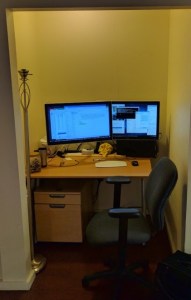
    I’ve got a great GTD flow going this morning!  Off to school for meetings this afternoon, but I have the 3×5 card + upgraded desk working together.  When I’m working at this desk, I’m smiling.  

    How do you feel about your desk?  

    Have a great flow-filled GTD afternoon!!!! 

    bill meade 

    p.s., Here is what happens to the cards when I move to the other office: Step 1 gathering … 

    D3M 5358

    Step 2: keeping separate 

    Betteraspect02