
I’m teaching a remedial Excel class this week, and so I’ve developed a tutorial to get people going using OneNote to capture crib sheets in Excel. I store my GTD crib sheets in Evernote (Example, Click here to subscribe). But OneNote is a great program too and if you have Microsoft’s Office, you have OneNote for free.
- If you have a Mac Office, you probably don’t have OneNote but you can get OneNote for free.
- If you have an older version of Office for windows you can get OneNote for free here.
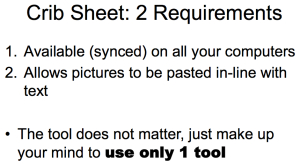
To create your OneNote Excel crib sheet do this:
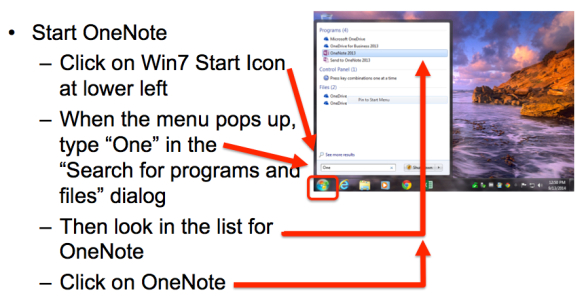
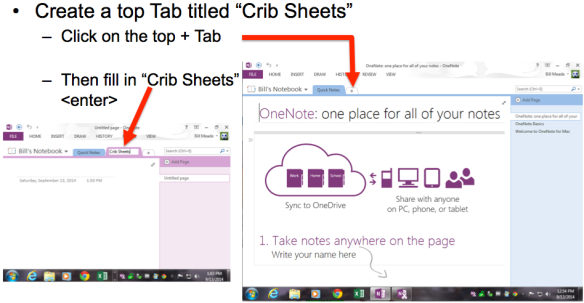
When OneNote opens, then create a top Tab titled “Crib Sheets:
Then add an Excel page:
Then copy the first entry from the image at the top of this blog post.
-
To enter A1 + B1 = C1 do this
-
With the pinky finger on your right hand, push the =
sign on the keyboard
-
Now, start Excel so we can get some practice using our Excel crib sheet!
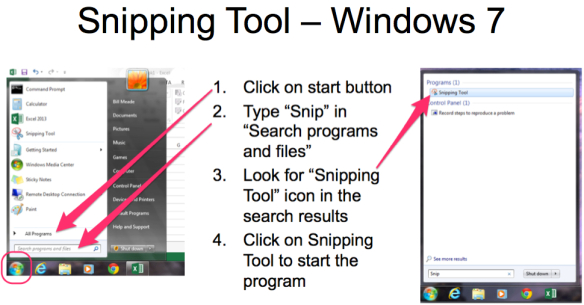
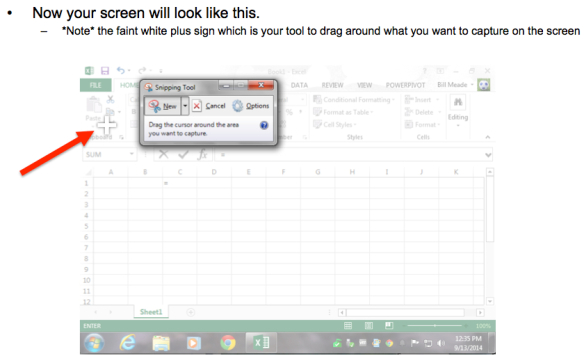
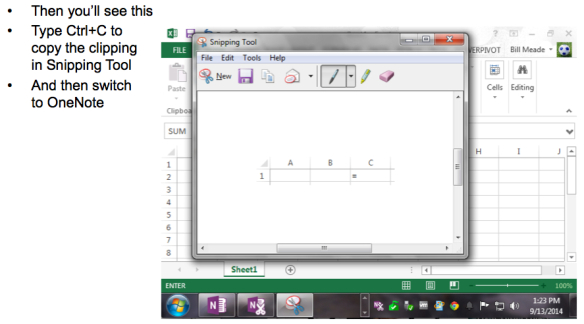
Next question: How do I snip from Excel?
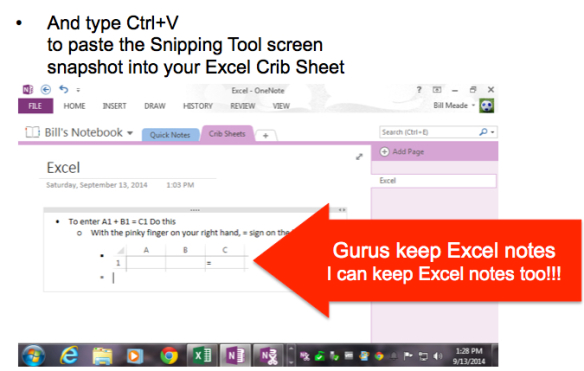
You have created an Excel crib sheet, and made your first entry!!!
bill
Pingback: Use GTD to become an Excel guru | RestartGTD